<!DOCTYPE html>
    <html lang="vi" xmlns="http://www.w3.org/1999/xhtml" prefix="og: http://ogp.me/ns#">
    <head>
<title>&quot;Bỏ túi&quot; thêm vài thủ thuật hay cho những ai dùng iPhone</title>
<meta name="description" content="&quot;Bỏ túi&quot; thêm vài thủ thuật hay cho những ai dùng iPhone - Savefile - Tin Tức -...">
<meta name="author" content="Hiếu Store【#1】Về iPhone, iPad, Macbook chính hãng giá rẻ Biên Hoà">
<meta name="copyright" content="Hiếu Store【#1】Về iPhone, iPad, Macbook chính hãng giá rẻ Biên Hoà [admin@example.com]">
<meta name="generator" content="NukeViet v4.4">
<meta name="viewport" content="width=device-width, initial-scale=1">
<meta http-equiv="Content-Type" content="text/html; charset=utf-8">
<meta property="og:title" content="&quot;Bỏ túi&quot; thêm vài thủ thuật hay cho những ai dùng iPhone">
<meta property="og:type" content="website">
<meta property="og:description" content="Savefile - Tin Tức - https&#x3A;&#x002F;&#x002F;hieuapple.com&#x002F;news&#x002F;savefile&#x002F;tin-cong-nghe&#x002F;bo-tui-them-vai-thu-thuat-hay-cho-nhung-ai-dung-iphone-48.html">
<meta property="og:site_name" content="Hiếu Store【&#x23;1】Về iPhone, iPad, Macbook chính hãng giá rẻ Biên Hoà">
<meta property="og:url" content="https://hieuapple.com/news/tin-cong-nghe/bo-tui-them-vai-thu-thuat-hay-cho-nhung-ai-dung-iphone-48.html">
<link rel="shortcut icon" href="https://hieuapple.com/uploads/hieustore.png">
<link rel="canonical" href="https://hieuapple.com/news/tin-cong-nghe/bo-tui-them-vai-thu-thuat-hay-cho-nhung-ai-dung-iphone-48.html">
<link rel="alternate" href="https://hieuapple.com/news/rss/" title="Tin Tức" type="application/rss+xml">
<link rel="alternate" href="https://hieuapple.com/news/rss/khuyen-mai/" title="Tin Tức - Khuyến mãi" type="application/rss+xml">
<link rel="alternate" href="https://hieuapple.com/news/rss/tin-cong-nghe/" title="Tin Tức - Tin công nghệ" type="application/rss+xml">
<link rel="alternate" href="https://hieuapple.com/news/rss/cong-thuc-mau/" title="Tin Tức - Công Thức Màu" type="application/rss+xml">
<link rel="preload" as="script" href="https://hieuapple.com/assets/js/jquery/jquery.min.js">
<link rel="preload" as="script" href="https://hieuapple.com/assets/js/language/vi.js">
<link rel="preload" as="script" href="https://hieuapple.com/assets/js/global.js">
<link rel="preload" as="script" href="https://hieuapple.com/themes/bcb_hieustore/js/news.js">
<link rel="preload" as="script" href="https://hieuapple.com/themes/bcb_hieustore/js/main.js">
<link rel="preload" as="script" href="https://www.googletagmanager.com/gtag/js?id=AW-620688594">
<link rel="preload" as="script" href="https://hieuapple.com/themes/bcb_hieustore/js/bootstrap.min.js">
<link rel="stylesheet" href="https://hieuapple.com/assets/css/font-awesome.min.css">
<link rel="stylesheet" href="https://hieuapple.com/themes/bcb_hieustore/css/bootstrap.min.css">
<link rel="stylesheet" href="https://hieuapple.com/themes/bcb_hieustore/css/style.css">
<link rel="stylesheet" href="https://hieuapple.com/themes/bcb_hieustore/css/style.responsive.css">
<link rel="StyleSheet" href="https://hieuapple.com/themes/bcb_hieustore/css/news.css">
<link rel="stylesheet" href="https://hieuapple.com/assets/css/bcb_hieustore.vi.0.css">
<style>
	body{background: #fff;}
.float-contact {position: fixed;bottom: 140px;left:55px;z-index: 99999;} .chat-zalo, .chat-face, .hotline{width: 50px;display: block;margin: 10px 5px;} .chat-zalo a>img, .chat-face a>img, .hotline a>img{width: 50px;} @media (max-width: 549px){.float-contact{display:block;}}

 @media screen and (max-width: 600px) {
  .float-contact {
display:none;
  }
}
 </style>
<!-- Google Tag Manager -->
<!-- End Google Tag Manager -->
<!-- Global site tag (gtag.js) - Google Ads: 620688594 -->
<script data-show="inline">(function(i,s,o,g,r,a,m){i['GoogleAnalyticsObject']=r;i[r]=i[r]||function(){
(i[r].q=i[r].q||[]).push(arguments)},i[r].l=1*new Date();a=s.createElement(o),
m=s.getElementsByTagName(o)[0];a.async=1;a.src=g;m.parentNode.insertBefore(a,m)
})(window,document,'script','https://www.google-analytics.com/analytics.js','ga');
ga('create', 'UA-173405386-1', '.hieuapple.com');
ga('send', 'pageview');
</script>
</head>
    <body class="page-news">
<div id="print">
	<div id="hd_print">
		<h2 class="pull-left">Hiếu Store【&#x23;1】Về iPhone, iPad, Macbook chính hãng giá rẻ Biên Hoà</h2>
		<p class="pull-right"><a title="Hiếu Store【&#x23;1】Về iPhone, iPad, Macbook chính hãng giá rẻ Biên Hoà" href="https://hieuapple.com/">https://hieuapple.com</a></p>
	</div>
	<div class="clear"></div>
	<hr />
	<div id="content">
		<h1>&quot;Bỏ túi&quot; thêm vài thủ thuật hay cho những ai dùng iPhone</h1>
		<ul class="list-inline">
			<li>Chủ nhật - 04/12/2022 22:23</li>
			<li class="hidden-print txtrequired"><em class="fa fa-print">&nbsp;</em><a title="In ra" href="javascript:;" onclick="window.print()">In ra</a></li>
			<li class="hidden-print txtrequired"><em class="fa fa-power-off">&nbsp;</em><a title="Đóng cửa sổ này" href="javascript:;" onclick="window.close()">Đóng cửa sổ này</a></li>
		</ul>
		<div class="clear"></div>
		<div id="hometext">
			Nhưng ai mới chuyển qua dùng iPhone; thường nghĩ nó là một sản phẩm đơn giản; dễ sử dụng và không có nhiều cái cần phải vọc. Nhưng không như các bạn nghĩ iPhone có rất nhiều thủ thuật hay mà bạn chưa biết. Nay Hiếu Store sẽ chỉ bạn những thủ thuật đó.
		</div>
		<div id="bodytext" class="clearfix">
			<ul>
	<li><strong><a href="https://hieuapple.com/news/tin-cong-nghe/cac-ung-dung-du-lich-ban-nen-bo-tui-giup-ich-khi-di-xa-49.html"><span style="color:rgb(52, 152, 219);">Các ứng dụng du lịch bạn nên ‘bỏ túi’ giúp ích khi đi xa</span></a></strong></li>
	<li><strong><a href="https://hieuapple.com/news/tin-cong-nghe/5-meo-an-tren-iphone-ma-it-ai-biet-neu-khong-duoc-noi-81.html"><span style="color:rgb(52, 152, 219);">5 mẹo ẩn trên iPhone mà ít ai biết nếu không được nói</span></a></strong></li>
	<li><strong><a href="https://hieuapple.com/news/tin-cong-nghe/dau-la-app-ma-100-nhan-vien-apple-se-khong-bao-gio-cai-103.html"><span style="color:rgb(52, 152, 219);">Đâu là app mà 100% nhân viên Apple sẽ không bao giờ cài?</span></a></strong></li>
</ul>

<h2><span style="color:rgb(0, 0, 0);"><span style="font-size:20px;"><strong>1. Xem các mật khẩu quan trọng mà chẳng may bạn quên mất</strong></span></span></h2>
&nbsp;

<p>Với nhưng ai &quot;não cá vàng&quot; như mình; thì việc ghi nhớ hàng loạt mật khẩu thì nó thật khủng khiếm. Nhưng bạn đừng lo lắng quá; <a href="https://hieuapple.com/iphone/"><strong>iPhone</strong></a> sẽ giúp bạn ghi nhớ. Apple gọi đó là tính năng điền mật khẩu cho ứng dụng. Bạn chỉ cần:</p>

<p><strong>Bước 1</strong>: Vào&nbsp;<strong>Cài đặt&gt; Mật khẩu</strong>. Trong mục này sẽ ghi nhớ; và điền mật khẩu các ứng dụng; tài khoản cho bạn. Nếu muốn xem lại những mật khẩu đó; thì hãy chọn tên của tài khoản muốn xem.<br />
&nbsp;</p>

<h3 style="text-align: center;"><img alt="thu thuat hay iphone" height="436" src="https://hieuapple.com/uploads/news/tin-tuc/thu-thuat-hay-iphone.png" width="435" /></h3>
&nbsp;

<p><strong>Bước 2</strong>: Bạn sẽ thấy mật khẩu tài khoản của mình; nhưng bạn phải dùng&nbsp;<strong>Touch ID&nbsp;</strong>hoặc&nbsp;<strong>Face ID</strong> của iPhone thì mới có thể truy cập được. Vì độ bảo mật cho người dùng thì không hãng nào qua lại Apple.<br />
&nbsp;</p>

<h2><span style="color:rgb(0, 0, 0);"><span style="font-size:20px;"><strong>2. Scan tài liệu bằng ứng dụng Ghi chú</strong></span></span></h2>

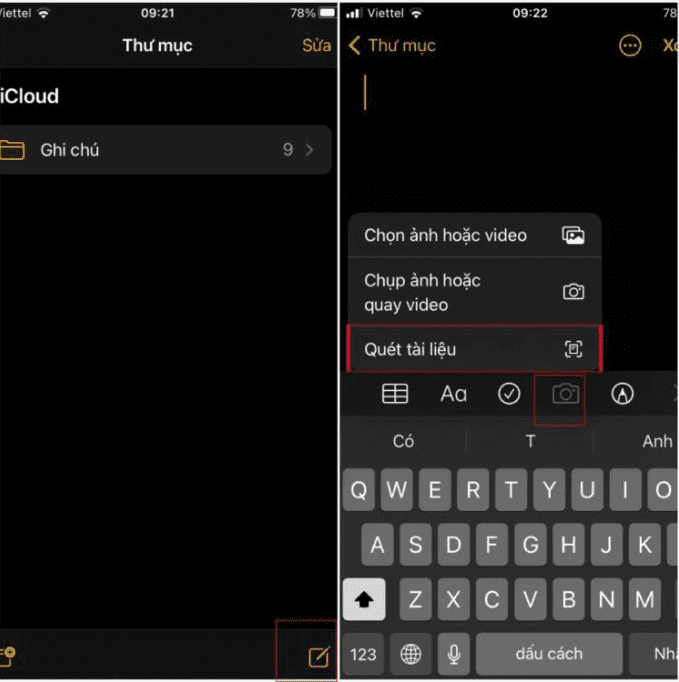
<p>Ghi chú là ứng dụng của iPhone ngoài việc lưu trữ tài liệu quan trọng; thì ngoài ra nó còn có thể Scan hình ảnh; tài liệu; chưng minh thư... cách dễ dàng.</p>

<p><strong>Bước 1</strong>: Vào&nbsp;<strong>Ghi chú</strong>; chọn&nbsp;<strong>Tạo Mới</strong>, sau đó chọn&nbsp;<strong>Máy ảnh&gt; Quét tài liệu.</strong><br />
&nbsp;</p>

<h3 style="text-align: center;"><img alt="scan tai lieu ghi chu" height="416" src="https://hieuapple.com/uploads/news/tin-tuc/scan-tai-lieu-ghi-chu.png" width="414" /></h3>
&nbsp;

<p><strong>Bước 2</strong>: Sau khi chụp; Bạn có thể sửa và lưu lại trong ghi chú mới.<br />
&nbsp;</p>

<h3>&nbsp;</h3>

<h2><span style="color:rgb(0, 0, 0);"><span style="font-size:20px;"><strong>3. iMessagevới nhiều tính năng thú vị</strong></span></span></h2>
&nbsp;

<p>Trong <strong>iMessage; </strong>chỉ cần<strong>&nbsp;giữ</strong>&nbsp;hoặc&nbsp;<strong>chạm liên tiếp hai lần</strong> vào tin nhắn thì có thể phản hồi nhanh như <strong>thả tim;</strong>&nbsp;<strong>haha;</strong>... Nếu muốn thu hồi; chỉ <strong>chạm</strong>&nbsp;và&nbsp;<strong>giữ</strong>&nbsp;hoặc&nbsp;<strong>chạm hai lần liên tiếp</strong> vào dòng tin nhắn; sau đó chọn <strong>biểu tượng cảm xúc</strong> đã thả để thu hồi.</p>

<h3 style="text-align: center;"><img alt="imess hieu ung" height="508" src="https://hieuapple.com/uploads/news/tin-tuc/imess-hieu-ung.png" width="286" /></h3>
&nbsp;

<h2><span style="color:rgb(0, 0, 0);"><span style="font-size:20px;"><strong>4. Nhờ Siri tung đồng xu quyết định</strong></span></span></h2>
&nbsp;

<p>Nhiều lúc bạn sẽ phân vân một việc gì đó; và tung đồng xu là cách phổ biến nhất để giải quyết. Và bạn có thể tung ngay trên iPhone với một câu lệnh đơn giản: &quot;<strong>Hey Siri, flip a coin</strong>&quot; là Siri sẽ tung một đồng xu ảo giúp bạn. <strong>Heads</strong> là ngửa và <strong>Tails&nbsp;</strong>là sấp.<br />
&nbsp;</p>

<h2><span style="font-size:20px;"><span style="color:rgb(0, 0, 0);"><strong>5. Ẩn nội dung thông báo trên màn hình khóa&nbsp;</strong></span></span></h2>
&nbsp;

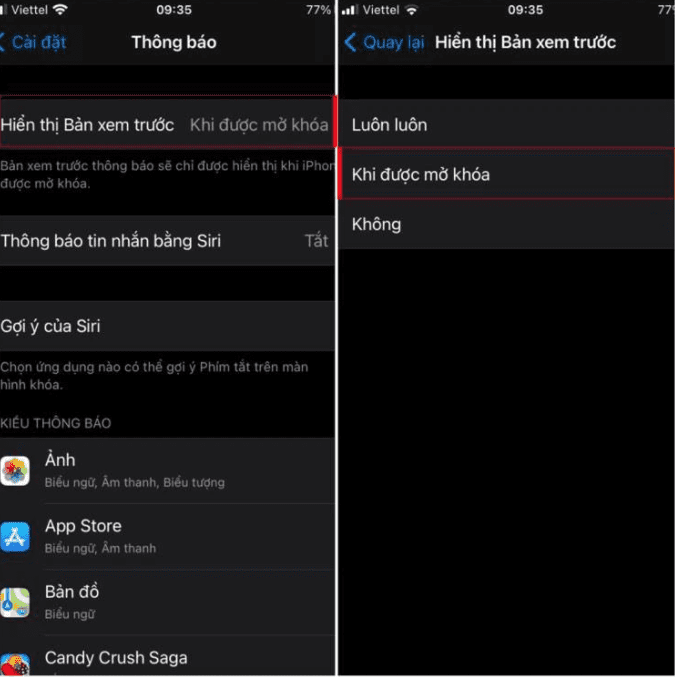
<p>Để tránh việc những thông báo trên màn hình của bạn bị người khác thấy; thì bạn hoàn toàn có thể ẩn đi nội dung thông báo trên màn hình khóa iPhone. Điều này giúp bảo vệ thông tin cũng như quyền riêng tư của bạn. Bằng cách:</p>

<p>Vào&nbsp;<strong>Cài đặt</strong>&nbsp;&gt; Chọn&nbsp;<strong>Thông báo</strong>&nbsp;&gt; Chọn&nbsp;<strong>Hiển thị bản xem trước</strong>&nbsp;&gt; Chọn<strong>&nbsp;Khi được mở khóa</strong>.<br />
&nbsp;</p>

<h3 style="text-align: center;"><img alt="an xem truoc tren iphone" height="532" src="https://hieuapple.com/uploads/news/tin-tuc/an-xem-truoc-tren-iphone.png" width="530" /></h3>
&nbsp;

<p>Hi vọng những tính năng trên sẽ giúp ích cho những bạn sử dụng iPhone một cách hiệu quả nhất.</p>

<blockquote>
<p><span style="font-size:16px;"><strong><a href="https://hieuapple.com/news/tin-cong-nghe/5-ung-dung-tren-iphone-khien-nguoi-dung-android-muon-co-102.html"><span style="color:rgb(52, 152, 219);">&gt;&gt; 5 ứng dụng trên iPhone khiến người dùng Android muốn có</span></a></strong></span></p>
</blockquote>

<h2 data-original-attrs="{&#039;style&#039;:&#039;&#039;}"><span style="color:rgb(0, 0, 0);"><span style="font-size:20px;"><strong>Thông Tin Liên Hệ :</strong></span></span></h2>
&nbsp;

<p>Địa chỉ :&nbsp;<a href="https://www.google.com/maps/place/Hi%E1%BA%BFu+Store/@10.9443269,106.8558012,17z/data=!3m1!4b1!4m5!3m4!1s0x3174dffca3dd1bdf:0xf1a02d50958524c2!8m2!3d10.9443269!4d106.8579899"><span style="color:rgb(52, 152, 219);"><strong>501, Khu Phố 2, Phạm Văn Thuận, Tp. Biên Hòa, Đồng Nai.</strong></span></a></p>

<p>Email:&nbsp;<a href="mailto:hieuthanh@hieuapple.com.com"><span style="color:rgb(52, 152, 219);">hieuthanh@hieuapple.com</span></a><span style="color:rgb(52, 152, 219);">.</span></p>

<p>Website:&nbsp;<strong><a href="https://hieuapple.com/" rel="noopener noreferrer" target="_blank"><span style="color:rgb(52, 152, 219);">hieuapple.com</span></a><span style="color:rgb(52, 152, 219);">.</span></strong></p>

<p>FanPage:&nbsp;<a href="https://www.facebook.com/HieuAppleBH"><span style="color:rgb(52, 152, 219);"><strong>https://www.facebook.com/HieuAppleBH</strong></span></a></p>
		</div>
	</div>
	<div id="footer" class="clearfix">
		<div id="url">
			<strong>URL của bản tin này: </strong><a href="https://hieuapple.com/news/tin-cong-nghe/bo-tui-them-vai-thu-thuat-hay-cho-nhung-ai-dung-iphone-48.html" title="&quot;Bỏ túi&quot; thêm vài thủ thuật hay cho những ai dùng iPhone">https://hieuapple.com/news/tin-cong-nghe/bo-tui-them-vai-thu-thuat-hay-cho-nhung-ai-dung-iphone-48.html</a>

		</div>
		<div class="clear"></div>
		<div class="copyright">
			&copy; Hiếu Store【&#x23;1】Về iPhone, iPad, Macbook chính hãng giá rẻ Biên Hoà
		</div>
		<div id="contact">
			<a href="mailto:admin@example.com">admin@example.com</a>
		</div>
	</div>
</div>
        <div id="timeoutsess" class="chromeframe">
            Bạn đã không sử dụng Site, <a onclick="timeoutsesscancel();" href="https://hieuapple.com/#">Bấm vào đây để duy trì trạng thái đăng nhập</a>. Thời gian chờ: <span id="secField"> 60 </span> giây
        </div>
        <div id="openidResult" class="nv-alert" style="display:none"></div>
        <div id="openidBt" data-result="" data-redirect=""></div>
<script src="https://hieuapple.com/assets/js/jquery/jquery.min.js"></script>
<script>var nv_base_siteurl="/",nv_lang_data="vi",nv_lang_interface="vi",nv_name_variable="nv",nv_fc_variable="op",nv_lang_variable="language",nv_module_name="news",nv_func_name="savefile",nv_is_user=0, nv_my_ofs=-4,nv_my_abbr="EDT",nv_cookie_prefix="nv4",nv_check_pass_mstime=3538000,nv_area_admin=0,nv_safemode=0,theme_responsive=1,nv_is_recaptcha=0;</script>
<script src="https://hieuapple.com/assets/js/language/vi.js"></script>
<script src="https://hieuapple.com/assets/js/global.js"></script>
<script src="https://hieuapple.com/themes/bcb_hieustore/js/news.js"></script>
<script src="https://hieuapple.com/themes/bcb_hieustore/js/main.js"></script>
<script type="application/ld+json">
        {
            "@context": "https://schema.org",
            "@type": "Organization",
            "url": "https://hieuapple.com",
            "logo": "https://hieuapple.com/uploads/logo.png"
        }
        </script>
<script>(function(w,d,s,l,i){w[l]=w[l]||[];w[l].push({'gtm.start':
new Date().getTime(),event:'gtm.js'});var f=d.getElementsByTagName(s)[0],
j=d.createElement(s),dl=l!='dataLayer'?'&l='+l:'';j.async=true;j.src=
'https://www.googletagmanager.com/gtm.js?id='+i+dl;f.parentNode.insertBefore(j,f);
})(window,document,'script','dataLayer','GTM-5G2NW99');</script>
<script async src="https://www.googletagmanager.com/gtag/js?id=AW-620688594"></script>
<script>
  window.dataLayer = window.dataLayer || [];
  function gtag(){dataLayer.push(arguments);}
  gtag('js', new Date());

  gtag('config', 'AW-620688594');
</script>
<script src="https://hieuapple.com/themes/bcb_hieustore/js/bootstrap.min.js"></script>
</body>
</html>
<ul class="extensions-contact">
    <li><a href="tel:1900588880" title="hotline"><img src="https://hieuapple.com/uploads/phone-call.svg" alt="hotline"><span>Gọi ngay</span></a></li>
    <li><a href="https://www.facebook.com/HieuAppleBH" title="facebook" target="_blank"><img src="https://hieuapple.com/uploads/messenger.svg" alt="facebook"><span>Messenger</span></a></li>
    <li><a href="https://zalo.me/0787999997" title="zalo" target="_blank"><img src="https://hieuapple.com/uploads/zalo.svg" alt="zalo"><span>Chat Zalo</span></a></li>
    <li><a href="https://www.google.com/maps/place/Hi%E1%BA%BFu+Apple+Store+-+Chuy%C3%AAn+iPhone+-+iPad+-+MacBook/@10.9440179,106.8556691,17z/data=!3m1!4b1!4m6!3m5!1s0x3174dd354aadc5d1:0x653f4de408b455ad!8m2!3d10.9440126!4d106.858244!16s%2Fg%2F11g0x2m4nv?entry=ttu&g_ep=EgoyMDI1MDQyMy4wIKXMDSoJLDEwMjExNDUzSAFQAw%3D%3D" title="maps" target="_blank"><img src="https://hieuapple.com/uploads/maps.svg" alt="maps"><span>Chỉ đường</span></a></li>
</ul>
<div class="float-contact">
<div class="chat-zalo"><a href="https://www.google.com/maps/place/Hi%E1%BA%BFu+Apple+Store+-+Chuy%C3%AAn+iPhone+-+iPad+-+MacBook/@10.9440179,106.8556691,17z/data=!3m1!4b1!4m6!3m5!1s0x3174dd354aadc5d1:0x653f4de408b455ad!8m2!3d10.9440126!4d106.858244!16s%2Fg%2F11g0x2m4nv?entry=ttu&g_ep=EgoyMDI1MDQyMy4wIKXMDSoJLDEwMjExNDUzSAFQAw%3D%3D"><img src="https://hieuapple.com/uploads/map-01.png"></a></div>
<div class="chat-face"><a href="https://www.facebook.com/HieuAppleBH"><img src="https://hieuapple.com/uploads/fb-01.png"></a></div>
</div>