<!DOCTYPE html>
    <html lang="vi" xmlns="http://www.w3.org/1999/xhtml" prefix="og: http://ogp.me/ns#">
    <head>
<title>Các mẹo và cách cần biết để khai thác sử dụng iCloud mức tối đa</title>
<meta name="description" content="Các mẹo và cách cần biết để khai thác sử dụng iCloud mức tối đa - Savefile - Tin Tức -...">
<meta name="author" content="Hiếu Store【#1】Về iPhone, iPad, Macbook chính hãng giá rẻ Biên Hoà">
<meta name="copyright" content="Hiếu Store【#1】Về iPhone, iPad, Macbook chính hãng giá rẻ Biên Hoà [admin@example.com]">
<meta name="generator" content="NukeViet v4.4">
<meta name="viewport" content="width=device-width, initial-scale=1">
<meta http-equiv="Content-Type" content="text/html; charset=utf-8">
<meta property="og:title" content="Các mẹo và cách cần biết để khai thác sử dụng iCloud mức tối đa">
<meta property="og:type" content="website">
<meta property="og:description" content="Savefile - Tin Tức - https&#x3A;&#x002F;&#x002F;hieuapple.com&#x002F;news&#x002F;savefile&#x002F;tin-cong-nghe&#x002F;cac-meo-va-cach-can-biet-de-khai-thac-su-dung-icloud-muc-toi-da-386.html">
<meta property="og:site_name" content="Hiếu Store【&#x23;1】Về iPhone, iPad, Macbook chính hãng giá rẻ Biên Hoà">
<meta property="og:url" content="https://hieuapple.com/news/tin-cong-nghe/cac-meo-va-cach-can-biet-de-khai-thac-su-dung-icloud-muc-toi-da-386.html">
<link rel="shortcut icon" href="https://hieuapple.com/uploads/hieustore.png">
<link rel="canonical" href="https://hieuapple.com/news/tin-cong-nghe/cac-meo-va-cach-can-biet-de-khai-thac-su-dung-icloud-muc-toi-da-386.html">
<link rel="alternate" href="https://hieuapple.com/news/rss/" title="Tin Tức" type="application/rss+xml">
<link rel="alternate" href="https://hieuapple.com/news/rss/khuyen-mai/" title="Tin Tức - Khuyến mãi" type="application/rss+xml">
<link rel="alternate" href="https://hieuapple.com/news/rss/tin-cong-nghe/" title="Tin Tức - Tin công nghệ" type="application/rss+xml">
<link rel="alternate" href="https://hieuapple.com/news/rss/cong-thuc-mau/" title="Tin Tức - Công Thức Màu" type="application/rss+xml">
<link rel="preload" as="script" href="https://hieuapple.com/assets/js/jquery/jquery.min.js">
<link rel="preload" as="script" href="https://hieuapple.com/assets/js/language/vi.js">
<link rel="preload" as="script" href="https://hieuapple.com/assets/js/global.js">
<link rel="preload" as="script" href="https://hieuapple.com/themes/bcb_hieustore/js/news.js">
<link rel="preload" as="script" href="https://hieuapple.com/themes/bcb_hieustore/js/main.js">
<link rel="preload" as="script" href="https://www.googletagmanager.com/gtag/js?id=AW-620688594">
<link rel="preload" as="script" href="https://hieuapple.com/themes/bcb_hieustore/js/bootstrap.min.js">
<link rel="stylesheet" href="https://hieuapple.com/assets/css/font-awesome.min.css">
<link rel="stylesheet" href="https://hieuapple.com/themes/bcb_hieustore/css/bootstrap.min.css">
<link rel="stylesheet" href="https://hieuapple.com/themes/bcb_hieustore/css/style.css">
<link rel="stylesheet" href="https://hieuapple.com/themes/bcb_hieustore/css/style.responsive.css">
<link rel="StyleSheet" href="https://hieuapple.com/themes/bcb_hieustore/css/news.css">
<link rel="stylesheet" href="https://hieuapple.com/assets/css/bcb_hieustore.vi.0.css">
<style>
	body{background: #fff;}
.float-contact {position: fixed;bottom: 140px;left:55px;z-index: 99999;} .chat-zalo, .chat-face, .hotline{width: 50px;display: block;margin: 10px 5px;} .chat-zalo a>img, .chat-face a>img, .hotline a>img{width: 50px;} @media (max-width: 549px){.float-contact{display:block;}}

 @media screen and (max-width: 600px) {
  .float-contact {
display:none;
  }
}
 </style>
<!-- Google Tag Manager -->
<!-- End Google Tag Manager -->
<!-- Global site tag (gtag.js) - Google Ads: 620688594 -->
<script data-show="inline">(function(i,s,o,g,r,a,m){i['GoogleAnalyticsObject']=r;i[r]=i[r]||function(){
(i[r].q=i[r].q||[]).push(arguments)},i[r].l=1*new Date();a=s.createElement(o),
m=s.getElementsByTagName(o)[0];a.async=1;a.src=g;m.parentNode.insertBefore(a,m)
})(window,document,'script','https://www.google-analytics.com/analytics.js','ga');
ga('create', 'UA-173405386-1', '.hieuapple.com');
ga('send', 'pageview');
</script>
</head>
    <body class="page-news">
<div id="print">
	<div id="hd_print">
		<h2 class="pull-left">Hiếu Store【&#x23;1】Về iPhone, iPad, Macbook chính hãng giá rẻ Biên Hoà</h2>
		<p class="pull-right"><a title="Hiếu Store【&#x23;1】Về iPhone, iPad, Macbook chính hãng giá rẻ Biên Hoà" href="https://hieuapple.com/">https://hieuapple.com</a></p>
	</div>
	<div class="clear"></div>
	<hr />
	<div id="content">
		<h1>Các mẹo và cách cần biết để khai thác sử dụng iCloud mức tối đa</h1>
		<ul class="list-inline">
			<li>Thứ tư - 27/07/2022 22:55</li>
			<li class="hidden-print txtrequired"><em class="fa fa-print">&nbsp;</em><a title="In ra" href="javascript:;" onclick="window.print()">In ra</a></li>
			<li class="hidden-print txtrequired"><em class="fa fa-power-off">&nbsp;</em><a title="Đóng cửa sổ này" href="javascript:;" onclick="window.close()">Đóng cửa sổ này</a></li>
		</ul>
		<div class="clear"></div>
		<div id="hometext">
			Không chỉ rất quan trọng trong vấn đề bảo mật; mà sử dụng iCloud còn là một giải pháp lưu trữ tuyệt vời trên iPhone.
		</div>
		<div id="bodytext" class="clearfix">
			<ul>
	<li><strong><a href="https://hieuapple.com/news/tin-cong-nghe/9-ly-do-gay-hao-pin-tren-iphone-ma-ban-nen-tranh-387.html"><span style="color:rgb(52, 152, 219);">9 lý do gây hao Pin trên iPhone mà bạn nên tránh</span></a></strong></li>
	<li><strong><a href="https://hieuapple.com/news/tin-cong-nghe/bo-thoi-quen-sac-du-phong-sau-khi-biet-cach-tiet-kiem-pin-iphone-nay-517.html"><span style="color:rgb(52, 152, 219);">Bỏ thói quen sạc dự phòng sau khi biết cách tiết kiệm pin iPhone này</span></a></strong></li>
	<li><strong><a href="https://hieuapple.com/news/tin-cong-nghe/cach-khoa-iphone-cua-ban-de-ngan-lo-du-lieu-khi-bi-mat-393.html"><span style="color:rgb(52, 152, 219);">Cách khoá điện thoại iPhone khi bị mất</span></a></strong></li>
</ul>

<p><strong>iCloud</strong> sẽ giúp bạn lưu trữ danh bạ; hình ảnh; ứng dụng; ghi chú; lịch;… trên <a href="https://hieuapple.com/iphone/"><span style="color:rgb(52, 152, 219);"><strong>iPhone</strong></span></a>/<a href="https://hieuapple.com/ipad/"><span style="color:rgb(52, 152, 219);"><strong>iPad</strong></span></a>. Đây là những dữ liệu thường đau đầu khi đổi&nbsp;qua điện thoại mới. Dùng&nbsp;<strong>iCloud</strong> thì chỉ cần đăng nhập; và kích hoạt trên máy mới thì mọi thứ sẽ tự động tải xuống. Không chỉ vậy; đây còn là công cụ bảo mật cho thiết bị; nếu chẳng may xảy ra sự cố mất máy.<br />
&nbsp;</p>

<h3 style="text-align: center;"><img alt="iCloud featured" height="337" src="https://hieuapple.com/uploads/news/tin-tuc/icloud-featured.png" style="border-radius:12px;" width="600" /></h3>
&nbsp;

<p>Với <strong>5GB</strong>&nbsp;miễn phí và có thể nâng lên <strong>50GB</strong>; <strong>200GB</strong> hay <strong>2TB</strong> với chi phí khả rẻ có thể tận dụng <strong>iCloud</strong> cho nhiều việc.<br />
&nbsp;</p>

<h2><span style="color:rgb(0, 0, 0);"><span style="font-size:20px;"><b>1. Sao lưu thiết bị</b></span></span></h2>
&nbsp;

<p>Với tài khoản <strong>iCloud</strong>; có thể sử dụng để sao lưu các thiết bị được hỗ trợ như <strong>iPhone</strong>; <strong>iPad</strong> hoặc&nbsp;<a href="https://hieuapple.com/apple-watch/"><span style="color:rgb(52, 152, 219);"><strong>Apple Watch</strong></span></a> và <strong>iPod Touch</strong>. Nhưng với&nbsp;<a href="https://hieuapple.com/mac/"><span style="color:rgb(52, 152, 219);"><strong>Mac</strong></span></a>;&nbsp;chỉ có&nbsp;lưu trữ các dữ liệu tại <strong>Documents;</strong> và <strong>Desktop</strong> mà thôi. Tất nhiên là nếu tài khoản <strong>iCloud</strong> của bạn có đủ dung lượng.</p>

<p>Sau khi đăng nhập tài khoản <strong>iCloud</strong> thì chỉ việc truy cập vào <strong>Cài đặt &gt; &#91;Tên_của_bạn&#93; &gt; iCloud &gt; Sao lưu iCloud</strong> để kích hoạt tính năng.</p>

<h3>&nbsp;</h3>

<p>Ở đây <strong>iCloud</strong> sẽ cho phép&nbsp;thao tác sao lưu; gồm&nbsp;thủ công và tự động. Bất cứ khi nào&nbsp;thiết bị có&nbsp;nguồn điện; và kết nối với <strong>Wi-F</strong>i thì việc sao lưu sẽ diễn ra tự động; kể cả đã khóa màn hình.<br />
&nbsp;</p>

<h3 style="text-align: center;"><img alt="icloud tip" height="606" src="https://hieuapple.com/uploads/news/tin-tuc/icloud-tip.jpg" style="border-radius:12px;" width="376" /></h3>
&nbsp;

<p>Tùy vào thiết lập mà&nbsp;các tác vụ sao lưu được thực hiện; gồm ứng dụng; cài đặt; màn hình chính; nhạc chuông; lịch sử mua hàng... Nếu&nbsp;bật lựa chọn &quot;Thư viện ảnh iCloud&quot; thì tất cả ảnh; và video của bạn cũng sẽ được sao lưu.</p>

<p>Để có thể khôi phục từ bản sao lưu <strong>iCloud</strong>; nhưng&nbsp;phải&nbsp;&quot;Xóa tất cả nội dung và cài đặt&quot; trong <strong>Cài đặt &gt; Cài đặt chung &gt; Đặt lại</strong>. Sau đó chọn &quot;Khôi phục từ sao lưu iCloud&quot; trong lúc thiết lập mới lại thiết bị.</p>

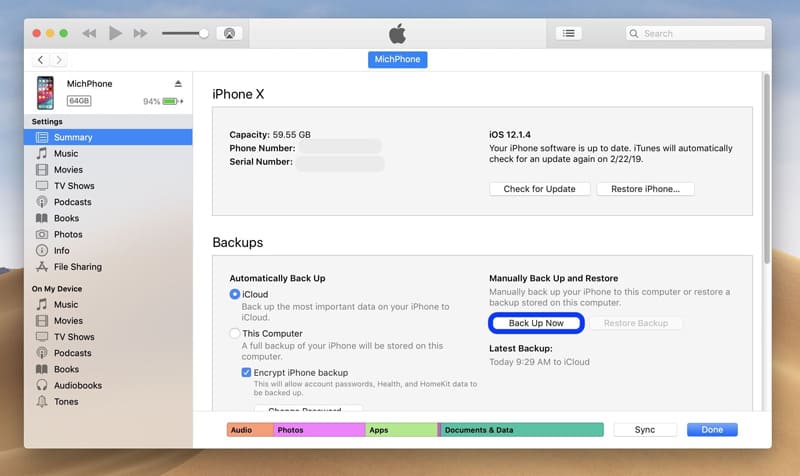
<p>Đừng quên còn&nbsp;lựa chọn; sao lưu <strong>iPhone</strong> và <strong>iPad</strong>&nbsp;bằng <strong>iTunes</strong>. Việc dùng&nbsp;<strong>iTunes</strong> để sao lưu tuy là lý tưởng; và nhanh&nbsp;trong việc chuyển dữ liệu từ thiết bị này; sang thiết bị khác nhưng nó lại không hữu ích trong trường hợp mất; hoặc hỏng thiết bị. Do đó; dùng&nbsp;<strong>iCloud</strong> để sao lưu là khả quan nhất.<br />
&nbsp;</p>

<h3 style="text-align: center;"><img alt="how to backup iphone itunes" height="357" src="https://hieuapple.com/uploads/news/tin-tuc/how-to-backup-iphone-itunes.jpg" style="border-radius:12px;" width="600" /></h3>
&nbsp;

<h2><span style="color:rgb(0, 0, 0);"><span style="font-size:20px;"><b>2. Sử dụng iCloud để lưu trữ ảnh và video</b></span></span></h2>
&nbsp;

<p>Bằng việc&nbsp;cho phép đồng bộ thư viện&nbsp;ảnh vào&nbsp;<strong>iCloud</strong>; cho phép&nbsp;truy cập các dữ liệu này trên mọi thiết bị.</p>

<h3>&nbsp;</h3>

<p>Khi muốn xem ảnh hoặc video; <strong>iCloud</strong> sẽ tải xuống phiên bản chất lượng. Dịch vụ này không giới hạn; bất cứ định dạng dữ liệu nào nên có thể xem đây; là một ưu điểm khá lớn của <strong>iCloud</strong> so với các &quot;đám mây&quot; khác.</p>

<p>Ngoài ra; có thể xem các dữ liệu ảnh; video trực tiếp&nbsp;hoặc tải xuống toàn bộ từ &quot;<a href="https://www.icloud.com/"><span style="color:rgb(52, 152, 219);"><strong>iCloud.com</strong></span></a>&quot;. Còn với máy tính<span style="color:rgb(52, 152, 219);"> </span><a href="https://hieuapple.com/macbook/"><span style="color:rgb(52, 152, 219);"><strong>Mac</strong></span></a>;&nbsp;có thể sử dụng ứng dụng <strong>Photos</strong>.<br />
&nbsp;</p>

<h2><span style="color:rgb(0, 0, 0);"><span style="font-size:20px;"><b>3. Lưu trữ các dữ liệu ứng dụng trên iCloud để dễ&nbsp;truy cập</b></span></span></h2>
&nbsp;

<p>Trên <strong>Mac</strong>; không phải ngẫu nhiên mà các ứng dụng như <strong>Pages</strong>; <strong>Numbers</strong>; <strong>GarageBand</strong> và <strong>TextEdit</strong>; được thiết lập mặc định lưu trữ trong <strong>iCloud</strong>. Đây là các ứng dụng hữu ích cho người dùng văn phòng; và nếu thực hiện các dự án trên chúng thì có thể thấy <strong>5GB</strong>; là hoàn toàn không đủ để lưu trữ.<br />
&nbsp;</p>

<h3 style="text-align: center;"><img alt="quan ly tep icloud drive" height="236" src="https://hieuapple.com/uploads/news/tin-tuc/quan-ly-tep-icloud-drive.png" style="border-radius:12px;" width="600" /></h3>
&nbsp;

<p>Việc sử dụng <strong>iCloud</strong> để làm nơi lưu trữ; sẽ giúp dễ dàng khôi phục lại nếu thiết bị&nbsp;xảy ra sự cố. Khi đó; chỉ cần kết nối internet là có thể tiếp tục làm việc.<br />
&nbsp;</p>

<h2><span style="color:rgb(0, 0, 0);"><span style="font-size:20px;"><b>4. Lưu trữ và chuyển dữ liệu qua iCloud</b></span></span></h2>
&nbsp;

<p>Giống&nbsp;<strong>Dropbox;</strong>&nbsp;<strong>Google Drive</strong> hoặc&nbsp;lưu trữ đám mây nào khác; có thể sử dụng dung lượng <strong>iCloud</strong>&nbsp;làm ổ đĩa&nbsp;lưu trữ dữ liệu. Điều này giúp&nbsp;dễ dàng chuyển tập tin thông&nbsp;qua web; đặc biệt tiện dụng.</p>

<p>Trên&nbsp;<strong>Mac</strong>; nhấp vào tùy chọn &quot;<strong>iCloud Drive</strong>&quot; từ <strong>Finder</strong>. Sau đó; tạo các thư mục; và di chuyển các dữ liệu như thao tác với dữ liệu cục bộ.<br />
&nbsp;</p>

<h3 style="text-align: center;"><img alt="file tai ve tren iphone" height="450" src="https://hieuapple.com/uploads/news/tin-tuc/file-tai-ve-tren-iphone.jpg" style="border-radius:12px;" width="550" /></h3>
&nbsp;

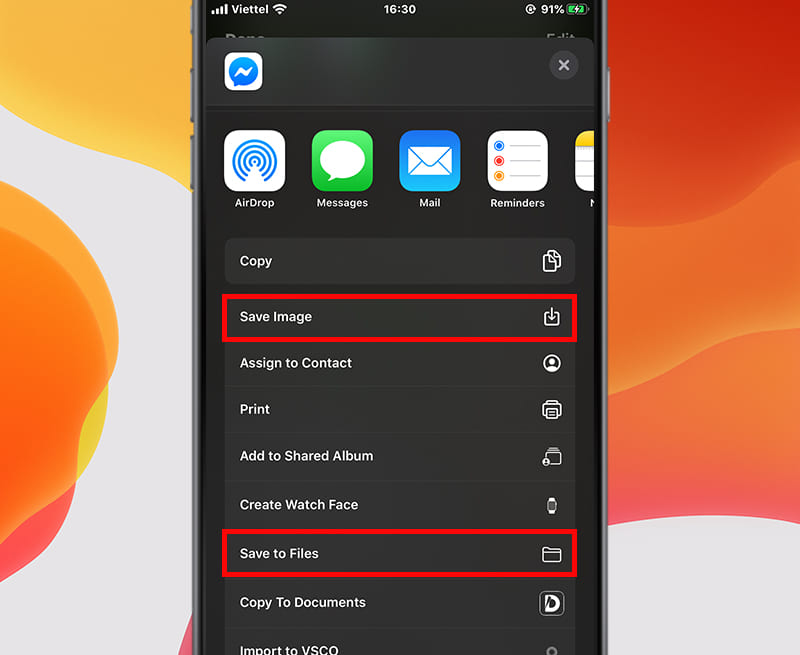
<p>Trên <strong>iPhone</strong> hoặc <strong>iPad</strong>; sử dụng ứng dụng &quot;Tệp&quot; để truy cập mọi thứ trên <strong>iCloud Drive</strong>. Để tải lên phải dùng&nbsp;tùy chọn &quot;Chia sẻ&quot; trong ứng dụng liên quan. Sau đó; chọn &quot;Lưu vào Tệp&quot;.</p>

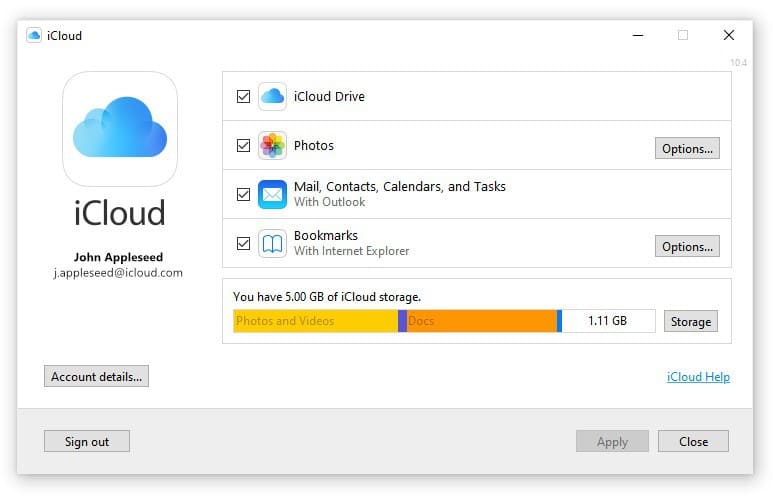
<p>Trên <strong>Windows;</strong>&nbsp;có thể cài đặt &quot;<strong>iCloud for Windows</strong>&quot;; sau đó bổ sung quyền truy cập <strong>iCloud Drive</strong> vào <strong>Files Explorer</strong>.&nbsp;<br />
&nbsp;</p>

<h3 style="text-align: center;"><img alt="icloud drive" height="386" src="https://hieuapple.com/uploads/news/tin-tuc/icloud-drive.jpg" style="border-radius:12px;" width="600" /></h3>
&nbsp;

<p>Trên web; truy cập toàn bộ dữ liệu <strong>iCloud</strong>&nbsp;thông qua &quot;<a href="https://www.icloud.com/"><span style="color:rgb(52, 152, 219);"><strong>iCloud.com</strong></span></a>&quot;. Và có thể sắp xếp; hoặc tải lên các tệp hoặc tạo các thư mục trong giao diện web. Có thể chia sẻ các thư mục với người khác thông qua địa chỉ email của họ.</p>

<p>Điều đáng ngạc nhiên nhất&nbsp;là không có giới hạn về các loại định dạng tập tin. Có thể tải lên nhạc; video; gói tin <strong>ZIP</strong> hoặc bất cứ thứ gì; miễn là chúng riêng lẻ và có dụng lượng dưới <strong>50 GB</strong>.<br />
&nbsp;</p>

<h2><span style="color:rgb(0, 0, 0);"><span style="font-size:20px;"><b>5. Giải phóng không gian lưu trữ cho máy tính Mac</b></span></span></h2>
&nbsp;

<p>Ở các&nbsp;<strong>macOS</strong> mới; hệ thống sẽ tự động tạo thêm không gian lưu trữ; bằng cách tối ưu hóa dữ liệu. Khi cần dung lượng; máy sẽ lưu giữ các tập tin; ảnh; video; phim trên <strong>Apple TV</strong> và ứng dụng; cũng như tệp đính kèm email vào <strong>iCloud</strong> và cung cấp chúng theo yêu cầu.</p>

<p>Các tập tin sẽ không chiếm dung lượng trên máy <strong>Mac</strong>; và&nbsp;có thể tải về các tập tin gốc khi cần.&nbsp;<br />
&nbsp;</p>

<h2><span style="color:rgb(0, 0, 0);"><span style="font-size:20px;"><b>6. Chia sẻ không gian lưu trữ iCloud với gia đình</b></span></span></h2>
&nbsp;

<p>Khi mua các gói lưu trữ <strong>iCloud</strong> với các dung lượng bắt đầu từ <strong>200 GB;</strong>&nbsp;thì <strong>iCloud</strong> sẽ cung cấp tùy chọn chia sẻ gia đình. Khi được kích hoạt; <strong>iCloud</strong> sẽ cung cấp cho mỗi người một không gian lưu trữ riêng; rất cá nhân; vì thế bạn không phải lo việc dữ liệu nhạy cảm của mình bị soi mói.</p>

<p>Các thành viên trong gia đình sẽ không có quyền truy cập vào tệp tin của nhau; nhưng có thể xem thành viên nào đang sử dụng bao nhiêu dung lượng lưu trữ.</p>

<blockquote>
<p><span style="font-size:16px;"><strong><a href="https://hieuapple.com/news/tin-cong-nghe/huong-dan-cach-tao-tai-khoan-id-apple-icloud-mien-phi-454.html"><span style="color:rgb(52, 152, 219);">&gt;&gt; Hướng dẫn cách tạo tài khoản ID Apple, iCloud miễn phí</span></a></strong></span></p>
</blockquote>

<h2 data-original-attrs="{&#039;style&#039;:&#039;&#039;}"><span style="color:rgb(0, 0, 0);"><span style="font-size:20px;"><strong>Thông Tin Liên Hệ :</strong></span></span></h2>
&nbsp;

<p>Địa chỉ :&nbsp;<a href="https://www.google.com/maps/place/Hi%E1%BA%BFu+Store/@10.9443269,106.8558012,17z/data=!3m1!4b1!4m5!3m4!1s0x3174dffca3dd1bdf:0xf1a02d50958524c2!8m2!3d10.9443269!4d106.8579899"><span style="color:rgb(52, 152, 219);"><strong>501, Khu Phố 2, Phạm Văn Thuận, Tp. Biên Hòa, Đồng Nai.</strong></span></a></p>

<p>Email:&nbsp;<strong><a href="mailto:hieuthanh@hieuapple.com.com"><span style="color:rgb(52, 152, 219);">hieuthanh@hieuapple.com</span></a><span style="color:rgb(52, 152, 219);">.</span></strong></p>

<p>Website:&nbsp;<strong><a href="https://hieuapple.com/" rel="noopener noreferrer" target="_blank"><span style="color:rgb(52, 152, 219);">hieuapple.com</span></a><span style="color:rgb(52, 152, 219);">.</span></strong></p>

<p>FanPage:&nbsp;<a href="https://www.facebook.com/HieuAppleBH"><span style="color:rgb(52, 152, 219);"><strong>https://www.facebook.com/HieuAppleBH</strong></span></a></p>
		</div>
	</div>
	<div id="footer" class="clearfix">
		<div id="url">
			<strong>URL của bản tin này: </strong><a href="https://hieuapple.com/news/tin-cong-nghe/cac-meo-va-cach-can-biet-de-khai-thac-su-dung-icloud-muc-toi-da-386.html" title="Các mẹo và cách cần biết để khai thác sử dụng iCloud mức tối đa">https://hieuapple.com/news/tin-cong-nghe/cac-meo-va-cach-can-biet-de-khai-thac-su-dung-icloud-muc-toi-da-386.html</a>

		</div>
		<div class="clear"></div>
		<div class="copyright">
			&copy; Hiếu Store【&#x23;1】Về iPhone, iPad, Macbook chính hãng giá rẻ Biên Hoà
		</div>
		<div id="contact">
			<a href="mailto:admin@example.com">admin@example.com</a>
		</div>
	</div>
</div>
        <div id="timeoutsess" class="chromeframe">
            Bạn đã không sử dụng Site, <a onclick="timeoutsesscancel();" href="https://hieuapple.com/#">Bấm vào đây để duy trì trạng thái đăng nhập</a>. Thời gian chờ: <span id="secField"> 60 </span> giây
        </div>
        <div id="openidResult" class="nv-alert" style="display:none"></div>
        <div id="openidBt" data-result="" data-redirect=""></div>
<script src="https://hieuapple.com/assets/js/jquery/jquery.min.js"></script>
<script>var nv_base_siteurl="/",nv_lang_data="vi",nv_lang_interface="vi",nv_name_variable="nv",nv_fc_variable="op",nv_lang_variable="language",nv_module_name="news",nv_func_name="savefile",nv_is_user=0, nv_my_ofs=-4,nv_my_abbr="EDT",nv_cookie_prefix="nv4",nv_check_pass_mstime=3538000,nv_area_admin=0,nv_safemode=0,theme_responsive=1,nv_is_recaptcha=0;</script>
<script src="https://hieuapple.com/assets/js/language/vi.js"></script>
<script src="https://hieuapple.com/assets/js/global.js"></script>
<script src="https://hieuapple.com/themes/bcb_hieustore/js/news.js"></script>
<script src="https://hieuapple.com/themes/bcb_hieustore/js/main.js"></script>
<script type="application/ld+json">
        {
            "@context": "https://schema.org",
            "@type": "Organization",
            "url": "https://hieuapple.com",
            "logo": "https://hieuapple.com/uploads/logo.png"
        }
        </script>
<script>(function(w,d,s,l,i){w[l]=w[l]||[];w[l].push({'gtm.start':
new Date().getTime(),event:'gtm.js'});var f=d.getElementsByTagName(s)[0],
j=d.createElement(s),dl=l!='dataLayer'?'&l='+l:'';j.async=true;j.src=
'https://www.googletagmanager.com/gtm.js?id='+i+dl;f.parentNode.insertBefore(j,f);
})(window,document,'script','dataLayer','GTM-5G2NW99');</script>
<script async src="https://www.googletagmanager.com/gtag/js?id=AW-620688594"></script>
<script>
  window.dataLayer = window.dataLayer || [];
  function gtag(){dataLayer.push(arguments);}
  gtag('js', new Date());

  gtag('config', 'AW-620688594');
</script>
<script src="https://hieuapple.com/themes/bcb_hieustore/js/bootstrap.min.js"></script>
</body>
</html>
<ul class="extensions-contact">
    <li><a href="tel:1900588880" title="hotline"><img src="https://hieuapple.com/uploads/phone-call.svg" alt="hotline"><span>Gọi ngay</span></a></li>
    <li><a href="https://www.facebook.com/HieuAppleBH" title="facebook" target="_blank"><img src="https://hieuapple.com/uploads/messenger.svg" alt="facebook"><span>Messenger</span></a></li>
    <li><a href="https://zalo.me/0787999997" title="zalo" target="_blank"><img src="https://hieuapple.com/uploads/zalo.svg" alt="zalo"><span>Chat Zalo</span></a></li>
    <li><a href="https://www.google.com/maps/place/Hi%E1%BA%BFu+Apple+Store+-+Chuy%C3%AAn+iPhone+-+iPad+-+MacBook/@10.9440179,106.8556691,17z/data=!3m1!4b1!4m6!3m5!1s0x3174dd354aadc5d1:0x653f4de408b455ad!8m2!3d10.9440126!4d106.858244!16s%2Fg%2F11g0x2m4nv?entry=ttu&g_ep=EgoyMDI1MDQyMy4wIKXMDSoJLDEwMjExNDUzSAFQAw%3D%3D" title="maps" target="_blank"><img src="https://hieuapple.com/uploads/maps.svg" alt="maps"><span>Chỉ đường</span></a></li>
</ul>
<div class="float-contact">
<div class="chat-zalo"><a href="https://www.google.com/maps/place/Hi%E1%BA%BFu+Apple+Store+-+Chuy%C3%AAn+iPhone+-+iPad+-+MacBook/@10.9440179,106.8556691,17z/data=!3m1!4b1!4m6!3m5!1s0x3174dd354aadc5d1:0x653f4de408b455ad!8m2!3d10.9440126!4d106.858244!16s%2Fg%2F11g0x2m4nv?entry=ttu&g_ep=EgoyMDI1MDQyMy4wIKXMDSoJLDEwMjExNDUzSAFQAw%3D%3D"><img src="https://hieuapple.com/uploads/map-01.png"></a></div>
<div class="chat-face"><a href="https://www.facebook.com/HieuAppleBH"><img src="https://hieuapple.com/uploads/fb-01.png"></a></div>
</div>