<!DOCTYPE html>
    <html lang="vi" xmlns="http://www.w3.org/1999/xhtml" prefix="og: http://ogp.me/ns#">
    <head>
<title>Các tùy biến danh bạ trên iPhone mà ít ai biết tới</title>
<meta name="description" content="Các tùy biến danh bạ trên iPhone mà ít ai biết tới - Savefile - Tin Tức -...">
<meta name="author" content="Hiếu Store【#1】Về iPhone, iPad, Macbook chính hãng giá rẻ Biên Hoà">
<meta name="copyright" content="Hiếu Store【#1】Về iPhone, iPad, Macbook chính hãng giá rẻ Biên Hoà [admin@example.com]">
<meta name="generator" content="NukeViet v4.4">
<meta name="viewport" content="width=device-width, initial-scale=1">
<meta http-equiv="Content-Type" content="text/html; charset=utf-8">
<meta property="og:title" content="Các tùy biến danh bạ trên iPhone mà ít ai biết tới">
<meta property="og:type" content="website">
<meta property="og:description" content="Savefile - Tin Tức - https&#x3A;&#x002F;&#x002F;hieuapple.com&#x002F;news&#x002F;savefile&#x002F;tin-cong-nghe&#x002F;cac-tuy-bien-danh-ba-tren-iphone-ma-it-ai-biet-toi-420.html">
<meta property="og:site_name" content="Hiếu Store【&#x23;1】Về iPhone, iPad, Macbook chính hãng giá rẻ Biên Hoà">
<meta property="og:url" content="https://hieuapple.com/news/tin-cong-nghe/cac-tuy-bien-danh-ba-tren-iphone-ma-it-ai-biet-toi-420.html">
<link rel="shortcut icon" href="https://hieuapple.com/uploads/hieustore.png">
<link rel="canonical" href="https://hieuapple.com/news/tin-cong-nghe/cac-tuy-bien-danh-ba-tren-iphone-ma-it-ai-biet-toi-420.html">
<link rel="alternate" href="https://hieuapple.com/news/rss/" title="Tin Tức" type="application/rss+xml">
<link rel="alternate" href="https://hieuapple.com/news/rss/khuyen-mai/" title="Tin Tức - Khuyến mãi" type="application/rss+xml">
<link rel="alternate" href="https://hieuapple.com/news/rss/tin-cong-nghe/" title="Tin Tức - Tin công nghệ" type="application/rss+xml">
<link rel="alternate" href="https://hieuapple.com/news/rss/cong-thuc-mau/" title="Tin Tức - Công Thức Màu" type="application/rss+xml">
<link rel="preload" as="script" href="https://hieuapple.com/assets/js/jquery/jquery.min.js">
<link rel="preload" as="script" href="https://hieuapple.com/assets/js/language/vi.js">
<link rel="preload" as="script" href="https://hieuapple.com/assets/js/global.js">
<link rel="preload" as="script" href="https://hieuapple.com/themes/bcb_hieustore/js/news.js">
<link rel="preload" as="script" href="https://hieuapple.com/themes/bcb_hieustore/js/main.js">
<link rel="preload" as="script" href="https://www.googletagmanager.com/gtag/js?id=AW-620688594">
<link rel="preload" as="script" href="https://hieuapple.com/themes/bcb_hieustore/js/bootstrap.min.js">
<link rel="stylesheet" href="https://hieuapple.com/assets/css/font-awesome.min.css">
<link rel="stylesheet" href="https://hieuapple.com/themes/bcb_hieustore/css/bootstrap.min.css">
<link rel="stylesheet" href="https://hieuapple.com/themes/bcb_hieustore/css/style.css">
<link rel="stylesheet" href="https://hieuapple.com/themes/bcb_hieustore/css/style.responsive.css">
<link rel="StyleSheet" href="https://hieuapple.com/themes/bcb_hieustore/css/news.css">
<link rel="stylesheet" href="https://hieuapple.com/assets/css/bcb_hieustore.vi.0.css">
<style>
	body{background: #fff;}
.float-contact {position: fixed;bottom: 140px;left:55px;z-index: 99999;} .chat-zalo, .chat-face, .hotline{width: 50px;display: block;margin: 10px 5px;} .chat-zalo a>img, .chat-face a>img, .hotline a>img{width: 50px;} @media (max-width: 549px){.float-contact{display:block;}}

 @media screen and (max-width: 600px) {
  .float-contact {
display:none;
  }
}
 </style>
<!-- Google Tag Manager -->
<!-- End Google Tag Manager -->
<!-- Global site tag (gtag.js) - Google Ads: 620688594 -->
<script data-show="inline">(function(i,s,o,g,r,a,m){i['GoogleAnalyticsObject']=r;i[r]=i[r]||function(){
(i[r].q=i[r].q||[]).push(arguments)},i[r].l=1*new Date();a=s.createElement(o),
m=s.getElementsByTagName(o)[0];a.async=1;a.src=g;m.parentNode.insertBefore(a,m)
})(window,document,'script','https://www.google-analytics.com/analytics.js','ga');
ga('create', 'UA-173405386-1', '.hieuapple.com');
ga('send', 'pageview');
</script>
</head>
    <body class="page-news">
<div id="print">
	<div id="hd_print">
		<h2 class="pull-left">Hiếu Store【&#x23;1】Về iPhone, iPad, Macbook chính hãng giá rẻ Biên Hoà</h2>
		<p class="pull-right"><a title="Hiếu Store【&#x23;1】Về iPhone, iPad, Macbook chính hãng giá rẻ Biên Hoà" href="https://hieuapple.com/">https://hieuapple.com</a></p>
	</div>
	<div class="clear"></div>
	<hr />
	<div id="content">
		<h1>Các tùy biến danh bạ trên iPhone mà ít ai biết tới</h1>
		<ul class="list-inline">
			<li>Thứ ba - 20/12/2022 21:13</li>
			<li class="hidden-print txtrequired"><em class="fa fa-print">&nbsp;</em><a title="In ra" href="javascript:;" onclick="window.print()">In ra</a></li>
			<li class="hidden-print txtrequired"><em class="fa fa-power-off">&nbsp;</em><a title="Đóng cửa sổ này" href="javascript:;" onclick="window.close()">Đóng cửa sổ này</a></li>
		</ul>
		<div class="clear"></div>
		<div id="hometext">
		</div>
		<div id="bodytext" class="clearfix">
			<p><strong>Bạn biết đấy; iPhone&nbsp;luôn có rất nhiều tính năng ẩn giúp ích cho người dùng. </strong><strong>Và có thể bạn chưa biết rằng; danh bạ trên iPhone còn có rất nhiều điều khác; hơn chỉ là lưu các liên hệ thông thường. </strong></p>

<ul>
	<li><strong><a href="https://hieuapple.com/news/tin-cong-nghe/khi-su-dung-wifi-noi-cong-cong-nen-luu-y-nhung-dieu-sau-day-421.html"><span style="color:rgb(52, 152, 219);">Khi sử dụng wifi nơi công cộng nên lưu ý!</span></a></strong></li>
	<li><strong><a href="https://hieuapple.com/news/tin-cong-nghe/7-thu-thuat-hay-it-ai-biet-chi-co-tren-iphone-422.html"><span style="color:rgb(52, 152, 219);">7 thủ thuật hay ít ai biết chỉ có trên iPhone</span></a></strong></li>
</ul>

<h2><span style="color:rgb(0, 0, 0);"><span style="font-size:20px;"><strong>1. Thay đổi kiểu hiển thị các liên hệ</strong></span></span></h2>
&nbsp;

<p>Thay đổi kiểu hiển thị; các liên hệ trong danh bạ <a href="https://hieuapple.com/iphone/"><span style="color:rgb(52, 152, 219);"><strong>iPhone</strong> </span></a>theo ý thích của bạn. Vào <strong>Cài đặt&nbsp;&gt;&nbsp;Danh bạ&nbsp;&gt;</strong> Thay đổi&nbsp;<strong>Thứ tự sắp xếp;</strong>&nbsp;hay&nbsp;<strong>Thứ tự hiển thị</strong>. Bạn cũng có thể bật <strong>Ưu tiên</strong> biệt danh; để dễ dàng tìm kiếm người bạn hay liên hệ nhất.<br />
&nbsp;</p>

<h3>&nbsp; &nbsp; &nbsp; &nbsp; &nbsp; &nbsp; &nbsp; &nbsp; &nbsp; &nbsp; &nbsp; &nbsp; &nbsp; &nbsp; &nbsp; &nbsp; &nbsp; &nbsp; &nbsp; &nbsp; &nbsp; &nbsp; &nbsp;<img alt="Meo-su-dung-danh-ba-iPhone" data-original="https://cdn.tgdd.vn/Files/2020/08/08/1277882/meo-su-dung-danh-ba-iphone-1-_1500x1334-800-resize.jpg" height="637" src="https://cdn.tgdd.vn/Files/2020/08/08/1277882/meo-su-dung-danh-ba-iphone-1-_1500x1334-800-resize.jpg" title="Meo-su-dung-danh-ba-iPhone" width="717" /></h3>
&nbsp;

<h2><span style="font-size:20px;"><span style="color:rgb(0, 0, 0);"><strong>2. Đồng bộ danh bạ với tài khoản Gmail</strong></span></span></h2>
&nbsp;

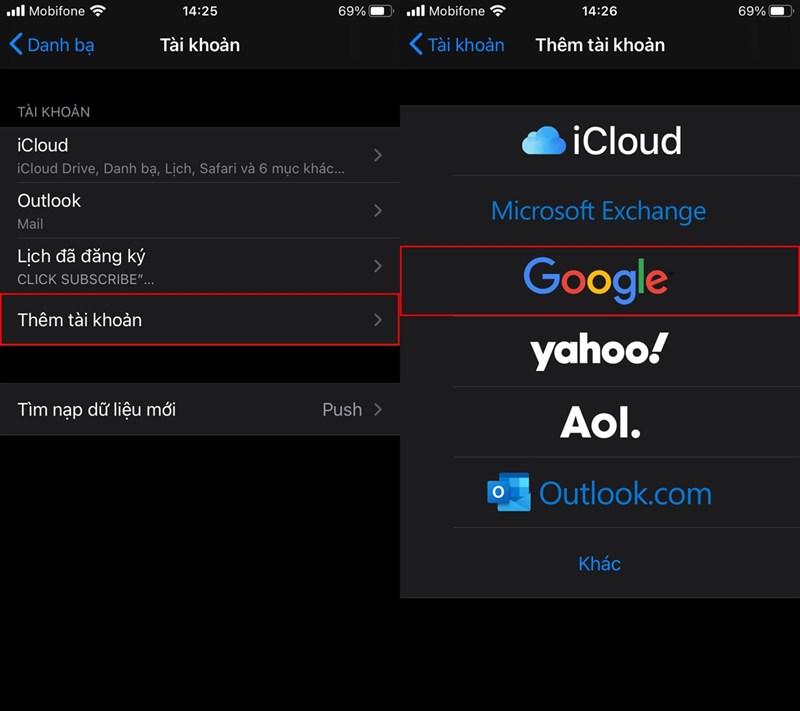
<p>Tính năng này sẽ rất hữu ích; khi bạn bị mất dữ liệu trên <strong>iPhone</strong> của mình. Vào <strong>Cài đặt</strong>&nbsp;&gt;&nbsp;<strong>Danh bạ</strong>&nbsp;&gt;&nbsp;<strong>Tài khoản</strong>. Sau đó; bạn chọn <strong>Thêm tài khoản;</strong>&nbsp;và chọn tài khoản <strong>Gmail</strong> bạn muốn đồng bộ danh bạ của mình.<br />
&nbsp;</p>

<h3>&nbsp; &nbsp; &nbsp; &nbsp; &nbsp; &nbsp; &nbsp; &nbsp; &nbsp; &nbsp; &nbsp; &nbsp; &nbsp; &nbsp; &nbsp; &nbsp; &nbsp; &nbsp; &nbsp; &nbsp; &nbsp; &nbsp; &nbsp;<img alt="Meo-su-dung-danh-ba-iPhone" data-original="https://cdn.tgdd.vn/Files/2020/08/08/1277882/meo-su-dung-danh-ba-iphone-2-_1500x1334-800-resize.jpg" height="636" src="https://cdn.tgdd.vn/Files/2020/08/08/1277882/meo-su-dung-danh-ba-iphone-2-_1500x1334-800-resize.jpg" title="Meo-su-dung-danh-ba-iPhone" width="716" /></h3>
&nbsp;

<h2><span style="color:rgb(0, 0, 0);"><span style="font-size:20px;"><strong>3. Sao lưu nhanh danh bạ trên iCloud</strong></span></span></h2>
&nbsp;

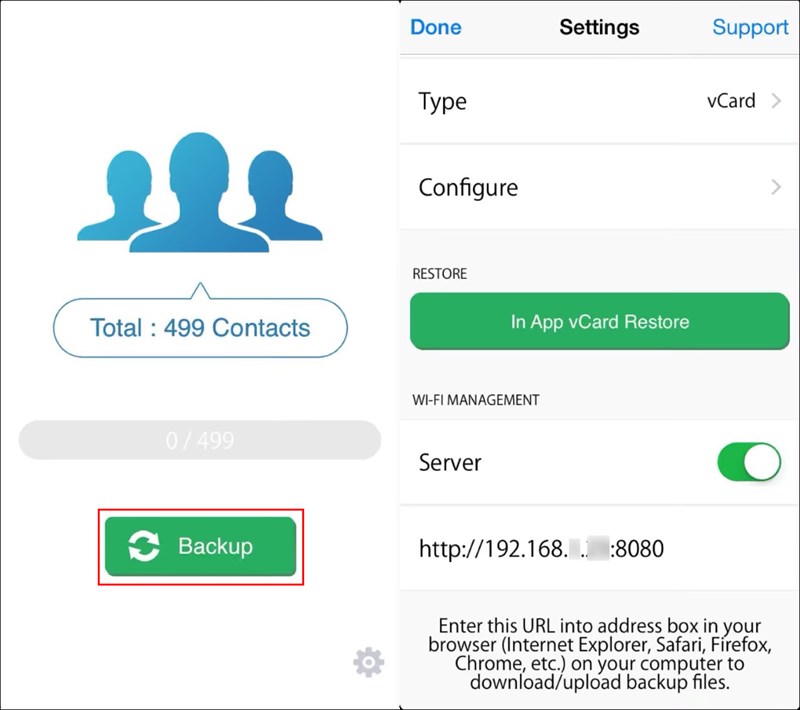
<p>Bạn cũng có thể tùy chọn; đồng bộ danh bạ của mình với <strong>iCloud</strong>. Với ứng dụng&nbsp;<strong>My Contacts Backup;</strong> cho phép bạn sao lưu tối đa <strong>500 liên hệ</strong> miễn phí; nếu muốn nhiều hơn thì bạn phải mua bản <strong>Pro</strong>.<br />
&nbsp;</p>

<ul>
	<li><strong><a href="https://apps.apple.com/in/app/my-contacts-backup/id446784593" rel="nofollow noopener noreferrer" target="_blank" title="My Contacts Backup on the App Store"><span style="color:rgb(52, 152, 219);">My Contacts Backup on the App Store</span></a></strong></li>
</ul>
&nbsp;

<h3>&nbsp; &nbsp; &nbsp; &nbsp; &nbsp; &nbsp; &nbsp; &nbsp; &nbsp; &nbsp; &nbsp; &nbsp; &nbsp; &nbsp; &nbsp; &nbsp; &nbsp; &nbsp; &nbsp; &nbsp; &nbsp; &nbsp;&nbsp;<img alt="Meo-su-dung-danh-ba-iPhone" data-original="https://cdn.tgdd.vn/Files/2020/08/08/1277882/meo-su-dung-danh-ba-iphone-3_1260x1118-800-resize.jpg" height="635" src="https://cdn.tgdd.vn/Files/2020/08/08/1277882/meo-su-dung-danh-ba-iphone-3_1260x1118-800-resize.jpg" title="Meo-su-dung-danh-ba-iPhone" width="715" /></h3>
&nbsp;

<h2><span style="font-size:20px;"><span style="color:rgb(0, 0, 0);"><strong>4. Chỉ cho phép iPhone nhận các cuộc gọi bạn muốn</strong></span></span></h2>
&nbsp;

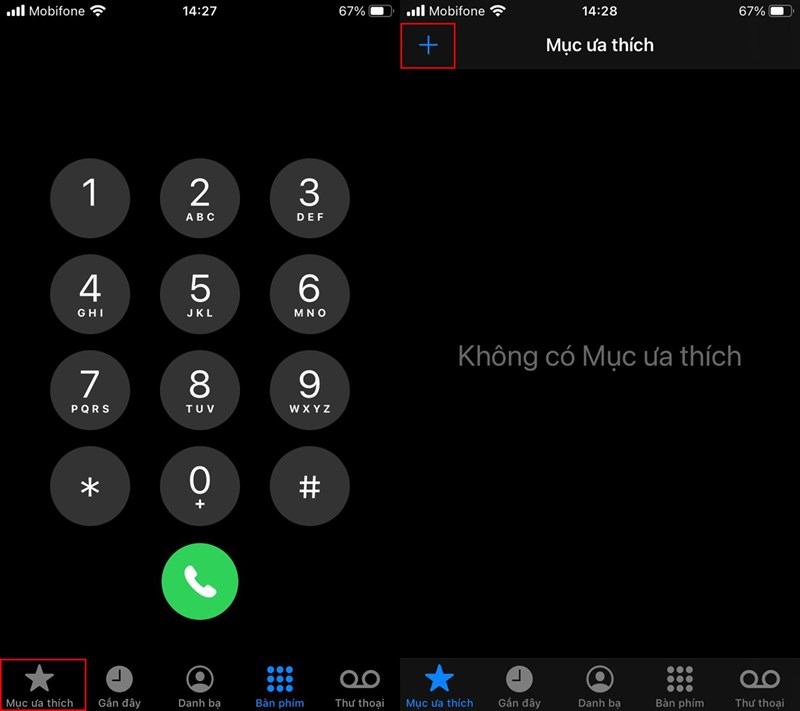
<p>Bạn có thể cho phép chỉ nhận các số điện thoại liên hệ; bằng cách mở ứng dụng <strong>Điện thoại</strong>&nbsp;&gt;&nbsp;<strong>Mục ưa thích</strong>&nbsp;&gt; Nhấn dấu&nbsp;<strong>&#039;+</strong>&#039;; và bắt đầu thêm các liên hệ ưa thích của bạn. Tiếp theo; vào <strong>Cài đặt</strong>&nbsp;&gt;&nbsp;<strong>Không làm phiền</strong>&nbsp;&gt;&nbsp;<strong>Cho phép cuộc gọi</strong>; từ <strong>Mục ưa thích</strong>.<br />
&nbsp;</p>

<h3>&nbsp; &nbsp; &nbsp; &nbsp; &nbsp; &nbsp; &nbsp; &nbsp; &nbsp; &nbsp; &nbsp; &nbsp; &nbsp; &nbsp; &nbsp; &nbsp; &nbsp; &nbsp; &nbsp; &nbsp; &nbsp; &nbsp; &nbsp;<img alt="Meo-su-dung-danh-ba-iPhone" data-original="https://cdn.tgdd.vn/Files/2020/08/08/1277882/meo-su-dung-danh-ba-iphone-4-_1500x1334-800-resize.jpg" height="637" src="https://cdn.tgdd.vn/Files/2020/08/08/1277882/meo-su-dung-danh-ba-iphone-4-_1500x1334-800-resize.jpg" title="Meo-su-dung-danh-ba-iPhone" width="717" /></h3>

<h2><br />
<strong><span style="color:rgb(0, 0, 0);"><span style="font-size:20px;">5. Bỏ qua tính năng chặn cuộc gọi khi khẩn cấp</span></span></strong></h2>
&nbsp;

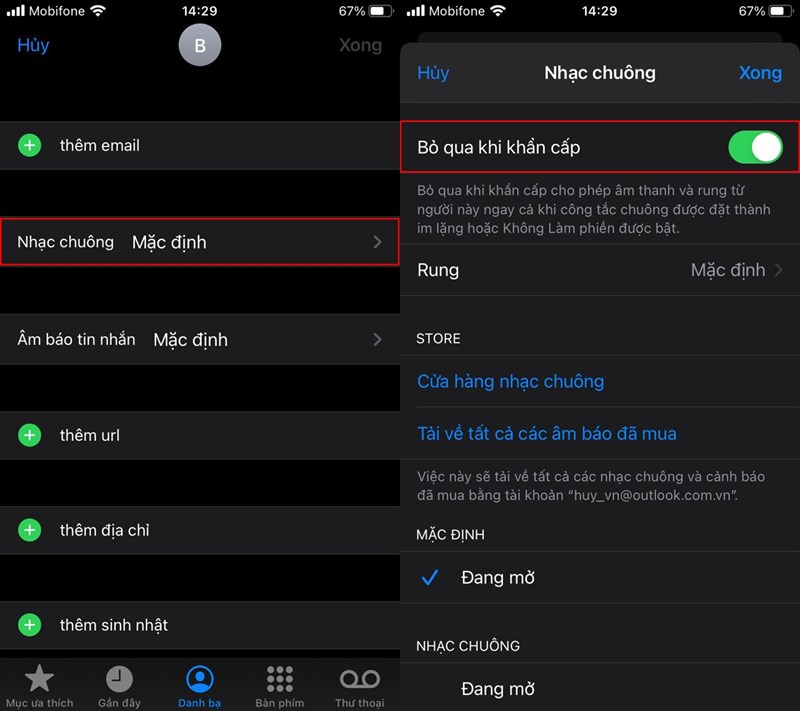
<p>Tính năng bỏ qua khi khẩn cấp này; hoạt động cho dù bạn kích hoạt chế độ <strong>Không làm phiền</strong> nhưng; vẫn có thể nhận các cuộc gọi khẩn cấp. Lựa chọn một liên hệ bạn muốn; nhấn <strong>Sửa</strong>&nbsp;&gt;&nbsp;<strong>Nhạc chuông</strong>&nbsp;&gt; Bật&nbsp;<strong>Bỏ qua khi khẩn cấp</strong>.<br />
&nbsp;</p>

<h3>&nbsp; &nbsp; &nbsp; &nbsp; &nbsp; &nbsp; &nbsp; &nbsp; &nbsp; &nbsp; &nbsp; &nbsp; &nbsp; &nbsp; &nbsp; &nbsp; &nbsp; &nbsp; &nbsp; &nbsp; &nbsp; &nbsp; &nbsp;<img alt="Meo-su-dung-danh-ba-iPhone" data-original="https://cdn.tgdd.vn/Files/2020/08/08/1277882/meo-su-dung-danh-ba-iphone-5-_1500x1334-800-resize.jpg" height="636" src="https://cdn.tgdd.vn/Files/2020/08/08/1277882/meo-su-dung-danh-ba-iphone-5-_1500x1334-800-resize.jpg" title="Meo-su-dung-danh-ba-iPhone" width="716" /></h3>
&nbsp;

<h2><span style="font-size:20px;"><span style="color:rgb(0, 0, 0);"><strong>6. Thêm các biệt danh</strong></span></span></h2>
&nbsp;

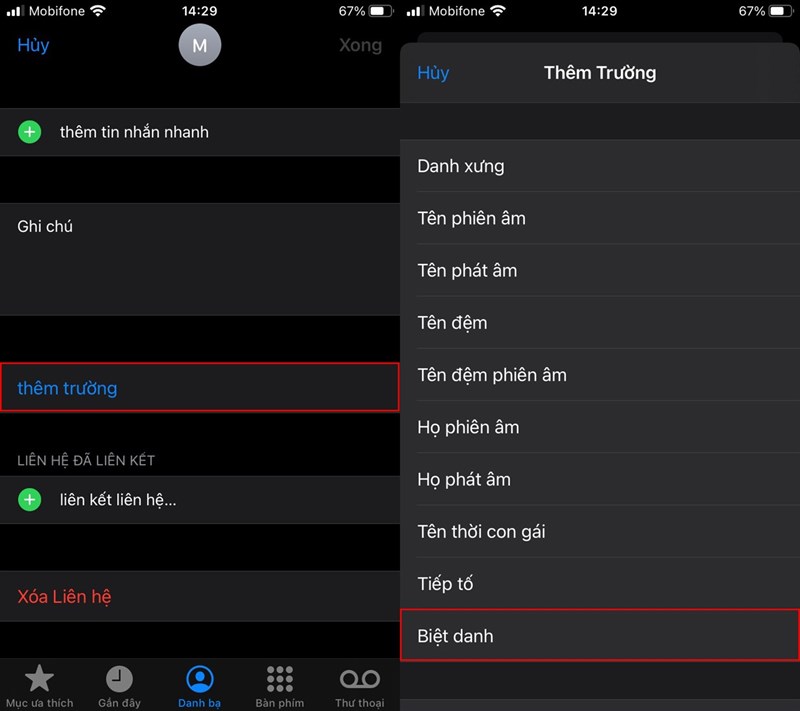
<p>Bạn có thể đặt các biệt danh; để liên lạc với họ nhanh bằng <strong>Siri</strong>. Vào <strong>Điện thoại</strong>&nbsp;&gt;&nbsp;<strong>Chọn liên hệ bạn muốn</strong>&nbsp;&gt;&nbsp;<strong>Sửa</strong>&nbsp;&gt;&nbsp;<strong>Thêm trường</strong>&nbsp;&gt;&nbsp;<strong>Biệt danh</strong>. Bây giờ, bạn đặt tên gọi liên hệ đó theo biệt danh bạn muốn.<br />
&nbsp;</p>

<h3>&nbsp; &nbsp; &nbsp; &nbsp; &nbsp; &nbsp; &nbsp; &nbsp; &nbsp; &nbsp; &nbsp; &nbsp; &nbsp; &nbsp; &nbsp; &nbsp; &nbsp; &nbsp; &nbsp; &nbsp; &nbsp; &nbsp; &nbsp;<img alt="Meo-su-dung-danh-ba-iPhone" data-original="https://cdn.tgdd.vn/Files/2020/08/08/1277882/meo-su-dung-danh-ba-iphone-6-_1500x1334-800-resize.jpg" height="637" src="https://cdn.tgdd.vn/Files/2020/08/08/1277882/meo-su-dung-danh-ba-iphone-6-_1500x1334-800-resize.jpg" title="Meo-su-dung-danh-ba-iPhone" width="717" /></h3>
&nbsp;

<h2><span style="color:rgb(0, 0, 0);"><span style="font-size:20px;"><strong>7. Xóa các liên hệ bị trùng lặp</strong></span></span></h2>
&nbsp;

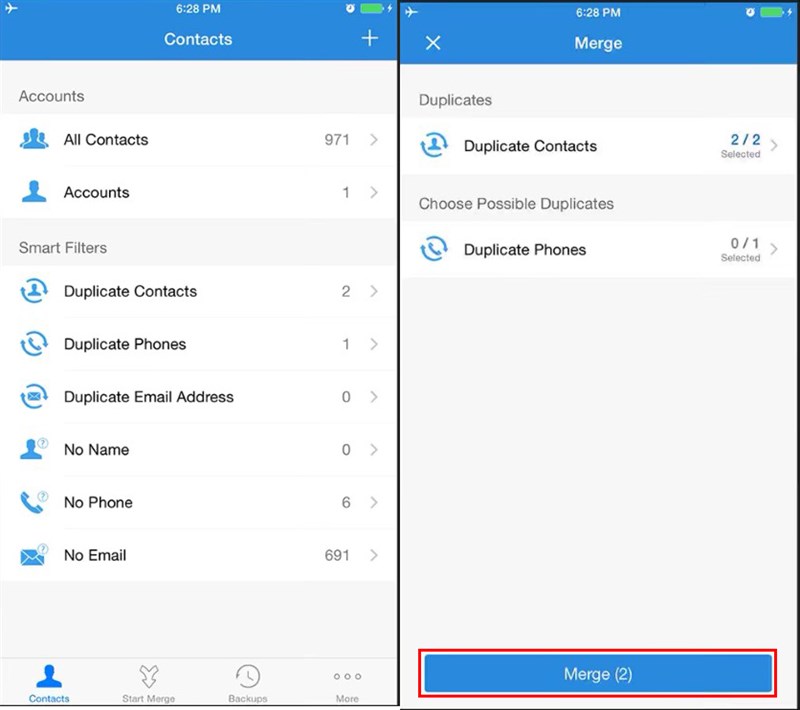
<p>Vì nhầm lẫn; bạn có thể đã lưu một liên hệ nhiều lần; gây nên sự trùng lặp. Hãy hợp nhất các liên hệ trùng lặp đó bằng ứng dụng <strong>Contact Cleanup</strong>.</p>

<ul>
	<li><strong><a href="https://apps.apple.com/us/app/contact-cleanup/id717884032" rel="nofollow noopener noreferrer" target="_blank" title="Contact Cleanup on the App Store">Contact Cleanup on the App Store</a></strong></li>
</ul>
&nbsp;

<h3>&nbsp; &nbsp; &nbsp; &nbsp; &nbsp; &nbsp; &nbsp; &nbsp; &nbsp; &nbsp; &nbsp; &nbsp; &nbsp; &nbsp; &nbsp; &nbsp; &nbsp; &nbsp; &nbsp; &nbsp; &nbsp; &nbsp; &nbsp;<img alt="Meo-su-dung-danh-ba-iPhone" data-original="https://cdn.tgdd.vn/Files/2020/08/08/1277882/meo-su-dung-danh-ba-iphone-7_836x742-800-resize.jpg" height="636" src="https://cdn.tgdd.vn/Files/2020/08/08/1277882/meo-su-dung-danh-ba-iphone-7_836x742-800-resize.jpg" title="Meo-su-dung-danh-ba-iPhone" width="717" /></h3>
&nbsp;

<h2><span style="color:rgb(0, 0, 0);"><span style="font-size:20px;"><strong>8. Thêm các thẻ liên lạc mới</strong></span></span></h2>
&nbsp;

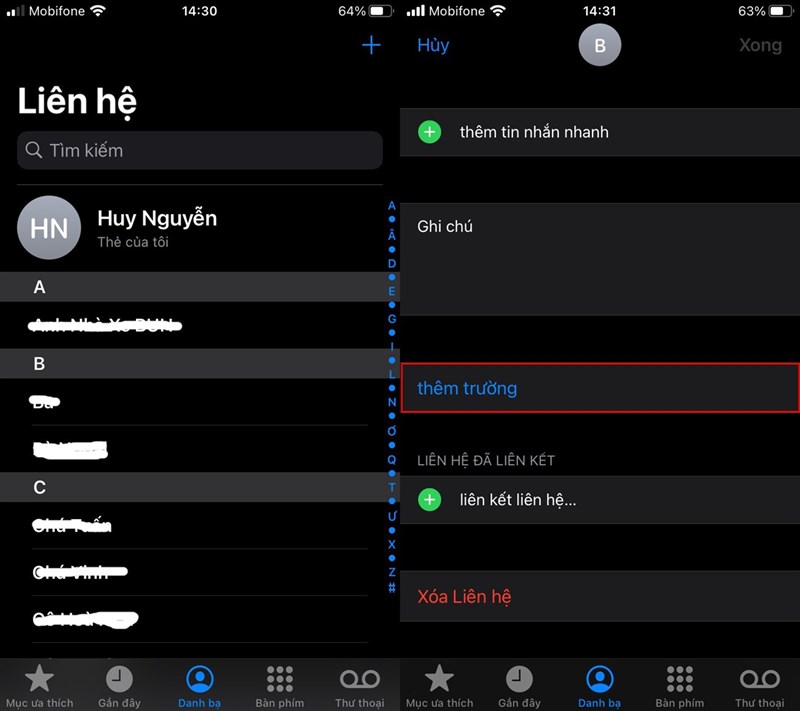
<p>Ngoài thẻ liên lạc mặc định của bạn ở trên cùng ứng dụng <strong>Điện thoại</strong>; bạn cũng có thể thêm các thẻ liên lạc khác như vậy bằng cách <strong>Thêm trường</strong>&nbsp;như biệt danh, chức vụ,...<br />
&nbsp;</p>

<h3>&nbsp; &nbsp; &nbsp; &nbsp; &nbsp; &nbsp; &nbsp; &nbsp; &nbsp; &nbsp; &nbsp; &nbsp; &nbsp; &nbsp; &nbsp; &nbsp; &nbsp; &nbsp; &nbsp; &nbsp; &nbsp; &nbsp; &nbsp;<img alt="Meo-su-dung-danh-ba-iPhone" data-original="https://cdn.tgdd.vn/Files/2020/08/08/1277882/meo-su-dung-danh-ba-iphone-8-_1500x1334-800-resize.jpg" height="637" src="https://cdn.tgdd.vn/Files/2020/08/08/1277882/meo-su-dung-danh-ba-iphone-8-_1500x1334-800-resize.jpg" title="Meo-su-dung-danh-ba-iPhone" width="717" /></h3>
&nbsp;

<p>Chúc các bạn có những trải nghiệm tuyệt vời trên <a href="https://hieuapple.com/iphone/"><span style="color:rgb(52, 152, 219);"><strong>iPhone</strong></span></a> của mình!</p>

<blockquote>
<p><span style="font-size:16px;"><a href="https://hieuapple.com/news/tin-cong-nghe/apple-vua-thay-doi-chinh-sach-bao-hanh-iphone-tai-viet-nam-490.html"><span style="color:rgb(52, 152, 219);"><strong>&gt;&gt; Apple vừa thay đổi chính sách bảo hành iPhone tại Việt Nam</strong></span></a></span></p>
</blockquote>

<h2><span style="color:rgb(0, 0, 0);"><span style="font-size:20px;"><strong>Thông Tin Liên Hệ :</strong></span></span></h2>
&nbsp;

<p>Địa chỉ :&nbsp;<a href="https://www.google.com/maps/place/Hi%E1%BA%BFu+Store/@10.9443269,106.8558012,17z/data=!3m1!4b1!4m5!3m4!1s0x3174dffca3dd1bdf:0xf1a02d50958524c2!8m2!3d10.9443269!4d106.8579899"><span style="color:rgb(52, 152, 219);"><strong>501, Khu Phố 2, Phạm Văn Thuận, Tp. Biên Hòa, Đồng Nai.</strong></span></a></p>

<p>Email:&nbsp;<a href="mailto:hieuthanh@hieuapple.com.com"><span style="color:rgb(52, 152, 219);">hieuthanh@hieuapple.com</span></a><span style="color:rgb(52, 152, 219);">.</span></p>

<p>Website:&nbsp;<strong><a href="https://hieuapple.com/" rel="noopener noreferrer" target="_blank"><span style="color:rgb(52, 152, 219);">hieuapple.com</span></a><span style="color:rgb(52, 152, 219);">.</span></strong></p>

<p>FanPage:&nbsp;<strong><a href="https://www.facebook.com/HieuAppleBH"><span style="color:rgb(52, 152, 219);">https://www.facebook.com/HieuAppleBH</span></a></strong></p>
		</div>
	</div>
	<div id="footer" class="clearfix">
		<div id="url">
			<strong>URL của bản tin này: </strong><a href="https://hieuapple.com/news/tin-cong-nghe/cac-tuy-bien-danh-ba-tren-iphone-ma-it-ai-biet-toi-420.html" title="Các tùy biến danh bạ trên iPhone mà ít ai biết tới">https://hieuapple.com/news/tin-cong-nghe/cac-tuy-bien-danh-ba-tren-iphone-ma-it-ai-biet-toi-420.html</a>

		</div>
		<div class="clear"></div>
		<div class="copyright">
			&copy; Hiếu Store【&#x23;1】Về iPhone, iPad, Macbook chính hãng giá rẻ Biên Hoà
		</div>
		<div id="contact">
			<a href="mailto:admin@example.com">admin@example.com</a>
		</div>
	</div>
</div>
        <div id="timeoutsess" class="chromeframe">
            Bạn đã không sử dụng Site, <a onclick="timeoutsesscancel();" href="https://hieuapple.com/#">Bấm vào đây để duy trì trạng thái đăng nhập</a>. Thời gian chờ: <span id="secField"> 60 </span> giây
        </div>
        <div id="openidResult" class="nv-alert" style="display:none"></div>
        <div id="openidBt" data-result="" data-redirect=""></div>
<script src="https://hieuapple.com/assets/js/jquery/jquery.min.js"></script>
<script>var nv_base_siteurl="/",nv_lang_data="vi",nv_lang_interface="vi",nv_name_variable="nv",nv_fc_variable="op",nv_lang_variable="language",nv_module_name="news",nv_func_name="savefile",nv_is_user=0, nv_my_ofs=-4,nv_my_abbr="EDT",nv_cookie_prefix="nv4",nv_check_pass_mstime=3538000,nv_area_admin=0,nv_safemode=0,theme_responsive=1,nv_is_recaptcha=0;</script>
<script src="https://hieuapple.com/assets/js/language/vi.js"></script>
<script src="https://hieuapple.com/assets/js/global.js"></script>
<script src="https://hieuapple.com/themes/bcb_hieustore/js/news.js"></script>
<script src="https://hieuapple.com/themes/bcb_hieustore/js/main.js"></script>
<script type="application/ld+json">
        {
            "@context": "https://schema.org",
            "@type": "Organization",
            "url": "https://hieuapple.com",
            "logo": "https://hieuapple.com/uploads/logo.png"
        }
        </script>
<script>(function(w,d,s,l,i){w[l]=w[l]||[];w[l].push({'gtm.start':
new Date().getTime(),event:'gtm.js'});var f=d.getElementsByTagName(s)[0],
j=d.createElement(s),dl=l!='dataLayer'?'&l='+l:'';j.async=true;j.src=
'https://www.googletagmanager.com/gtm.js?id='+i+dl;f.parentNode.insertBefore(j,f);
})(window,document,'script','dataLayer','GTM-5G2NW99');</script>
<script async src="https://www.googletagmanager.com/gtag/js?id=AW-620688594"></script>
<script>
  window.dataLayer = window.dataLayer || [];
  function gtag(){dataLayer.push(arguments);}
  gtag('js', new Date());

  gtag('config', 'AW-620688594');
</script>
<script src="https://hieuapple.com/themes/bcb_hieustore/js/bootstrap.min.js"></script>
</body>
</html>
<ul class="extensions-contact">
    <li><a href="tel:1900588880" title="hotline"><img src="https://hieuapple.com/uploads/phone-call.svg" alt="hotline"><span>Gọi ngay</span></a></li>
    <li><a href="https://www.facebook.com/HieuAppleBH" title="facebook" target="_blank"><img src="https://hieuapple.com/uploads/messenger.svg" alt="facebook"><span>Messenger</span></a></li>
    <li><a href="https://zalo.me/0787999997" title="zalo" target="_blank"><img src="https://hieuapple.com/uploads/zalo.svg" alt="zalo"><span>Chat Zalo</span></a></li>
    <li><a href="https://www.google.com/maps/place/Hi%E1%BA%BFu+Apple+Store+-+Chuy%C3%AAn+iPhone+-+iPad+-+MacBook/@10.9440179,106.8556691,17z/data=!3m1!4b1!4m6!3m5!1s0x3174dd354aadc5d1:0x653f4de408b455ad!8m2!3d10.9440126!4d106.858244!16s%2Fg%2F11g0x2m4nv?entry=ttu&g_ep=EgoyMDI1MDQyMy4wIKXMDSoJLDEwMjExNDUzSAFQAw%3D%3D" title="maps" target="_blank"><img src="https://hieuapple.com/uploads/maps.svg" alt="maps"><span>Chỉ đường</span></a></li>
</ul>
<div class="float-contact">
<div class="chat-zalo"><a href="https://www.google.com/maps/place/Hi%E1%BA%BFu+Apple+Store+-+Chuy%C3%AAn+iPhone+-+iPad+-+MacBook/@10.9440179,106.8556691,17z/data=!3m1!4b1!4m6!3m5!1s0x3174dd354aadc5d1:0x653f4de408b455ad!8m2!3d10.9440126!4d106.858244!16s%2Fg%2F11g0x2m4nv?entry=ttu&g_ep=EgoyMDI1MDQyMy4wIKXMDSoJLDEwMjExNDUzSAFQAw%3D%3D"><img src="https://hieuapple.com/uploads/map-01.png"></a></div>
<div class="chat-face"><a href="https://www.facebook.com/HieuAppleBH"><img src="https://hieuapple.com/uploads/fb-01.png"></a></div>
</div>