<!DOCTYPE html>
    <html lang="vi" xmlns="http://www.w3.org/1999/xhtml" prefix="og: http://ogp.me/ns#">
    <head>
<title>Cách tạo nhạc chuông iPhone cực kỳ đơn giản không phải ra tiệm</title>
<meta name="description" content="Cách tạo nhạc chuông iPhone cực kỳ đơn giản không phải ra tiệm - Savefile - Tin Tức -...">
<meta name="author" content="Hiếu Store【#1】Về iPhone, iPad, Macbook chính hãng giá rẻ Biên Hoà">
<meta name="copyright" content="Hiếu Store【#1】Về iPhone, iPad, Macbook chính hãng giá rẻ Biên Hoà [admin@example.com]">
<meta name="generator" content="NukeViet v4.4">
<meta name="viewport" content="width=device-width, initial-scale=1">
<meta http-equiv="Content-Type" content="text/html; charset=utf-8">
<meta property="og:title" content="Cách tạo nhạc chuông iPhone cực kỳ đơn giản không phải ra tiệm">
<meta property="og:type" content="website">
<meta property="og:description" content="Savefile - Tin Tức - https&#x3A;&#x002F;&#x002F;hieuapple.com&#x002F;news&#x002F;savefile&#x002F;tin-cong-nghe&#x002F;cach-tao-nhac-chuong-iphone-cuc-ky-don-gian-khong-phai-ra-tiem-413.html">
<meta property="og:site_name" content="Hiếu Store【&#x23;1】Về iPhone, iPad, Macbook chính hãng giá rẻ Biên Hoà">
<meta property="og:url" content="https://hieuapple.com/news/tin-cong-nghe/cach-tao-nhac-chuong-iphone-cuc-ky-don-gian-khong-phai-ra-tiem-413.html">
<link rel="shortcut icon" href="https://hieuapple.com/uploads/hieustore.png">
<link rel="canonical" href="https://hieuapple.com/news/tin-cong-nghe/cach-tao-nhac-chuong-iphone-cuc-ky-don-gian-khong-phai-ra-tiem-413.html">
<link rel="alternate" href="https://hieuapple.com/news/rss/" title="Tin Tức" type="application/rss+xml">
<link rel="alternate" href="https://hieuapple.com/news/rss/khuyen-mai/" title="Tin Tức - Khuyến mãi" type="application/rss+xml">
<link rel="alternate" href="https://hieuapple.com/news/rss/tin-cong-nghe/" title="Tin Tức - Tin công nghệ" type="application/rss+xml">
<link rel="alternate" href="https://hieuapple.com/news/rss/cong-thuc-mau/" title="Tin Tức - Công Thức Màu" type="application/rss+xml">
<link rel="preload" as="script" href="https://hieuapple.com/assets/js/jquery/jquery.min.js">
<link rel="preload" as="script" href="https://hieuapple.com/assets/js/language/vi.js">
<link rel="preload" as="script" href="https://hieuapple.com/assets/js/global.js">
<link rel="preload" as="script" href="https://hieuapple.com/themes/bcb_hieustore/js/news.js">
<link rel="preload" as="script" href="https://hieuapple.com/themes/bcb_hieustore/js/main.js">
<link rel="preload" as="script" href="https://www.googletagmanager.com/gtag/js?id=AW-620688594">
<link rel="preload" as="script" href="https://hieuapple.com/themes/bcb_hieustore/js/bootstrap.min.js">
<link rel="stylesheet" href="https://hieuapple.com/assets/css/font-awesome.min.css">
<link rel="stylesheet" href="https://hieuapple.com/themes/bcb_hieustore/css/bootstrap.min.css">
<link rel="stylesheet" href="https://hieuapple.com/themes/bcb_hieustore/css/style.css">
<link rel="stylesheet" href="https://hieuapple.com/themes/bcb_hieustore/css/style.responsive.css">
<link rel="StyleSheet" href="https://hieuapple.com/themes/bcb_hieustore/css/news.css">
<link rel="stylesheet" href="https://hieuapple.com/assets/css/bcb_hieustore.vi.0.css">
<style>
	body{background: #fff;}
.float-contact {position: fixed;bottom: 140px;left:55px;z-index: 99999;} .chat-zalo, .chat-face, .hotline{width: 50px;display: block;margin: 10px 5px;} .chat-zalo a>img, .chat-face a>img, .hotline a>img{width: 50px;} @media (max-width: 549px){.float-contact{display:block;}}

 @media screen and (max-width: 600px) {
  .float-contact {
display:none;
  }
}
 </style>
<!-- Google Tag Manager -->
<!-- End Google Tag Manager -->
<!-- Global site tag (gtag.js) - Google Ads: 620688594 -->
<script data-show="inline">(function(i,s,o,g,r,a,m){i['GoogleAnalyticsObject']=r;i[r]=i[r]||function(){
(i[r].q=i[r].q||[]).push(arguments)},i[r].l=1*new Date();a=s.createElement(o),
m=s.getElementsByTagName(o)[0];a.async=1;a.src=g;m.parentNode.insertBefore(a,m)
})(window,document,'script','https://www.google-analytics.com/analytics.js','ga');
ga('create', 'UA-173405386-1', '.hieuapple.com');
ga('send', 'pageview');
</script>
</head>
    <body class="page-news">
<div id="print">
	<div id="hd_print">
		<h2 class="pull-left">Hiếu Store【&#x23;1】Về iPhone, iPad, Macbook chính hãng giá rẻ Biên Hoà</h2>
		<p class="pull-right"><a title="Hiếu Store【&#x23;1】Về iPhone, iPad, Macbook chính hãng giá rẻ Biên Hoà" href="https://hieuapple.com/">https://hieuapple.com</a></p>
	</div>
	<div class="clear"></div>
	<hr />
	<div id="content">
		<h1>Cách tạo nhạc chuông iPhone cực kỳ đơn giản không phải ra tiệm</h1>
		<ul class="list-inline">
			<li>Thứ bảy - 04/12/2021 22:00</li>
			<li class="hidden-print txtrequired"><em class="fa fa-print">&nbsp;</em><a title="In ra" href="javascript:;" onclick="window.print()">In ra</a></li>
			<li class="hidden-print txtrequired"><em class="fa fa-power-off">&nbsp;</em><a title="Đóng cửa sổ này" href="javascript:;" onclick="window.close()">Đóng cửa sổ này</a></li>
		</ul>
		<div class="clear"></div>
		<div id="hometext">
			Hiện nay có nhiều phần mềm hỗ trợ tạo nhạc chuông cho iPhone từ máy tính. Tuy nhiên; để tạo nhạc chuông thì hãy thử cách tạo nhạc chuông trên iPhone; thông qua ứng dụng GarageBand nhé!
		</div>
		<div id="bodytext" class="clearfix">
			<ul>
	<li><span style="color:rgb(52, 152, 219);"><strong>Cách đổi icon trên iOS 15 đẹp mắt cho iPhone chỉ vài bước đơn giản.</strong></span></li>
	<li><span style="color:rgb(52, 152, 219);"><strong>Mẹo dọn dẹp vệ sinh iPhone mượt mà để chuẩn bị bước sang năm mới.</strong></span></li>
	<li><a href="https://hieuapple.com/news/tin-cong-nghe/7-cach-cuu-iphone-bi-roi-xuong-nuoc-ma-ban-can-nen-biet-171.html"><span style="color:rgb(52, 152, 219);"><strong>7 Cách cứu iPhone bị rơi xuống nước mà bạn cần nên biết.</strong></span></a></li>
</ul>

<h2><span style="color:rgb(0, 0, 0);"><span style="font-size:20px;"><strong>Sau đây hướng dẫn&nbsp;các bạn cài nhạc chuông trực tiếp cho iPhone</strong></span></span></h2>
&nbsp;

<p><strong>Bước 1:</strong> Bạn lên <strong>Safari</strong> hay bất cứ một trình duyệt nào; truy cập vào các <strong>trang web</strong> tải nhạc chuông; chọn bài nhạc chuông ưng ý với bạn và tải về.</p>

<ul>
	<li><strong><a href="https://apps.apple.com/us/app/garageband/id408709785"><span style="color:rgb(52, 152, 219);">Tải GarageBand cài nhạc chuông tại đây</span></a></strong></li>
</ul>

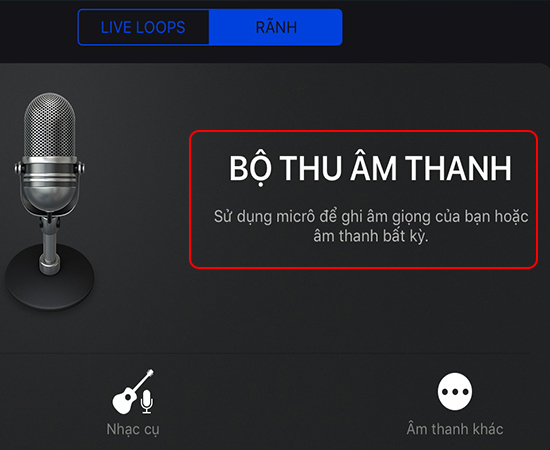
<p id="subhmenuid1"><span style="color:rgb(0, 0, 0);"><strong>Bước 2:</strong></span> Chọn Bộ thu âm thanh trong phần mềm GarageBand.</p>

<p>Đầu tiên từ ngoài màn hình <a href="https://hieuapple.com/iphone/"><span style="color:rgb(52, 152, 219);"><strong>iPhone</strong></span></a>; bạn chọn vào phần mềm<strong>&nbsp;GarageBand</strong>&nbsp;&gt; <strong>Vuốt qua phải để chọn&nbsp;Bộ thu âm thanh.</strong><br />
&nbsp;</p>

<h3>&nbsp; &nbsp; &nbsp; &nbsp; &nbsp; &nbsp; &nbsp; &nbsp; &nbsp; &nbsp; &nbsp; &nbsp; &nbsp; &nbsp; &nbsp; &nbsp; &nbsp; &nbsp; &nbsp; &nbsp; &nbsp; &nbsp; &nbsp; &nbsp; &nbsp; &nbsp; &nbsp; &nbsp; &nbsp; &nbsp; &nbsp; &nbsp; &nbsp;&nbsp;<img alt="chọn bộ thu âm thanh" data-original="//cdn3.tgdd.vn/hoi-dap/1033942/huong-dan-tao-nhac-chuong-truc-tiep-cho-iphone-02.jpg" height="411" src="https://cdn3.tgdd.vn/hoi-dap/1033942/huong-dan-tao-nhac-chuong-truc-tiep-cho-iphone-02.jpg" title="chọn bộ thu âm thanh" width="502" /></h3>
&nbsp;

<p id="subhmenuid2"><span style="color:rgb(0, 0, 0);"><strong>Bước 3:</strong></span>&nbsp;Chọn biểu tượng sọc ngang</p>

<p>Tại đây bạn chọn; <strong>biểu tượng sọc ngang</strong> ở góc trên bên trái màn hình.</p>

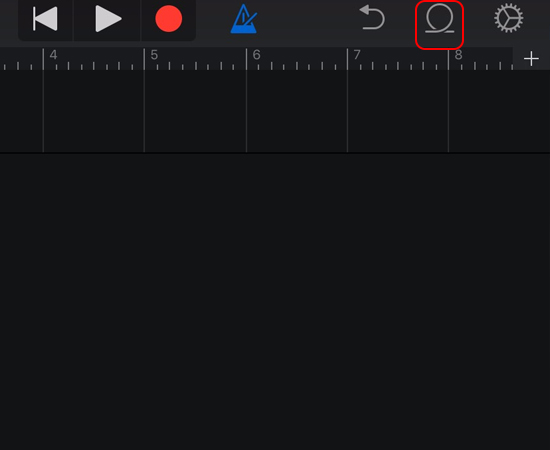
<p id="subhmenuid3"><span style="color:rgb(0, 0, 0);"><strong>Bước 4: </strong></span>Chọn&nbsp;biểu tượng Loop</p>

<p>Bạn chọn vào<strong>&nbsp;biểu tượng Loop</strong>&nbsp;ở góc trên bên phải màn hình.<br />
&nbsp;</p>

<h3>&nbsp; &nbsp; &nbsp; &nbsp; &nbsp; &nbsp; &nbsp; &nbsp; &nbsp; &nbsp; &nbsp; &nbsp; &nbsp; &nbsp; &nbsp; &nbsp; &nbsp; &nbsp; &nbsp; &nbsp; &nbsp; &nbsp; &nbsp; &nbsp; &nbsp; &nbsp; &nbsp; &nbsp; &nbsp; &nbsp; &nbsp; &nbsp; &nbsp;&nbsp;<img alt="biểu tượng Loop" data-original="//cdn.tgdd.vn/hoi-dap/1033942/huong-dan-tao-nhac-chuong-truc-tiep-cho-iphone-04.jpg" height="411" src="https://cdn.tgdd.vn/hoi-dap/1033942/huong-dan-tao-nhac-chuong-truc-tiep-cho-iphone-04.jpg" title="biểu tượng Loop" width="502" /></h3>
&nbsp;

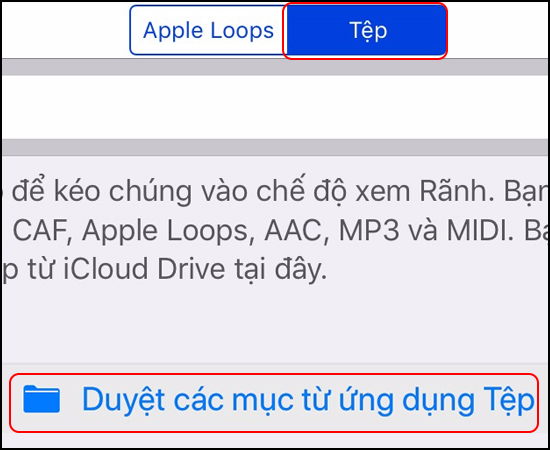
<p id="subhmenuid4"><span style="color:rgb(0, 0, 0);"><strong>Bước 5:&nbsp;</strong></span>Duyệt các mục từ ứng dụng Tệp</p>

<p>Tiếp theo bạn chọn vào&nbsp;<strong>Tệp &gt;</strong>&nbsp;Chọn&nbsp;<strong>Duyệt các mục từ ứng dụng Tệp</strong>&nbsp;để vào phần chọn nhạc.<br />
&nbsp;</p>

<h3>&nbsp; &nbsp; &nbsp; &nbsp; &nbsp; &nbsp; &nbsp; &nbsp; &nbsp; &nbsp; &nbsp; &nbsp; &nbsp; &nbsp; &nbsp; &nbsp; &nbsp; &nbsp; &nbsp; &nbsp; &nbsp; &nbsp; &nbsp; &nbsp; &nbsp; &nbsp; &nbsp; &nbsp; &nbsp; &nbsp; &nbsp; &nbsp; &nbsp;&nbsp;<img alt="vào các mục từ ứng dụng tệp" data-original="//cdn1.tgdd.vn/hoi-dap/1033942/huong-dan-tao-nhac-chuong-truc-tiep-cho-iphone-05.jpg" height="410" src="https://cdn1.tgdd.vn/hoi-dap/1033942/huong-dan-tao-nhac-chuong-truc-tiep-cho-iphone-05.jpg" title="vào các mục từ ứng dụng tệp" width="501" /></h3>
&nbsp;

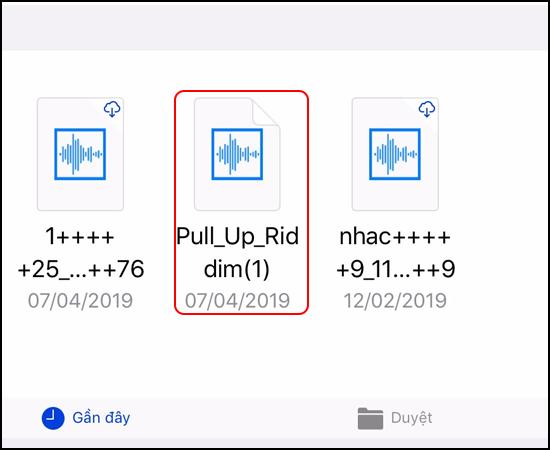
<p id="subhmenuid5"><strong>Bước 6:&nbsp;</strong>Chọn nhạc</p>

<p>Tại đây bạn&nbsp;<strong>chọn nhạc</strong>&nbsp;mà mình muốn thêm vào phần mềm để chỉnh sửa tạo nhạc chuông.<br />
&nbsp;</p>

<h3>&nbsp; &nbsp; &nbsp; &nbsp; &nbsp; &nbsp; &nbsp; &nbsp; &nbsp; &nbsp; &nbsp; &nbsp; &nbsp; &nbsp; &nbsp; &nbsp; &nbsp; &nbsp; &nbsp; &nbsp; &nbsp; &nbsp; &nbsp; &nbsp; &nbsp; &nbsp; &nbsp; &nbsp; &nbsp; &nbsp; &nbsp; &nbsp; &nbsp; &nbsp;<img alt="chọn nhạc" data-original="//cdn2.tgdd.vn/hoi-dap/1033942/huong-dan-tao-nhac-chuong-truc-tiep-cho-iphone-06.jpg" height="411" src="https://cdn2.tgdd.vn/hoi-dap/1033942/huong-dan-tao-nhac-chuong-truc-tiep-cho-iphone-06.jpg" title="chọn nhạc" width="502" /></h3>

<p>​<strong>Bước 7:&nbsp;</strong>Kéo nhạc vào khu vực chỉnh sửa</p>

<p>Lúc này bạn ấn giữ; và<strong> kéo nhạc vào khu vực chỉnh sửa;</strong> chọn đoạn mà bạn muốn làm nhạc chuông.</p>

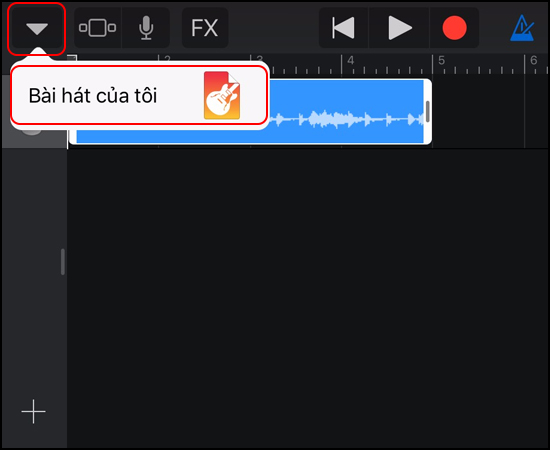
<p id="subhmenuid7"><strong>Bước 8: </strong>Chọn Bài hát của tôi</p>

<p>Sau khi chỉnh sửa xong bạn chọn vào&nbsp;<strong>biểu tượng tam giác ngược</strong> ở góc trên bên trái &gt; Chọn vào <strong>Bài hát của tôi</strong>&nbsp;để lưu lại.<br />
&nbsp;</p>

<h3>&nbsp; &nbsp; &nbsp; &nbsp; &nbsp; &nbsp; &nbsp; &nbsp; &nbsp; &nbsp; &nbsp; &nbsp; &nbsp; &nbsp; &nbsp; &nbsp; &nbsp; &nbsp; &nbsp; &nbsp; &nbsp; &nbsp; &nbsp; &nbsp; &nbsp; &nbsp; &nbsp; &nbsp; &nbsp; &nbsp; &nbsp; &nbsp; &nbsp;&nbsp;<img alt="lưu lại bản nhạc" data-original="//cdn.tgdd.vn/hoi-dap/1033942/huong-dan-tao-nhac-chuong-truc-tiep-cho-iphone-09.jpg" height="411" src="https://cdn.tgdd.vn/hoi-dap/1033942/huong-dan-tao-nhac-chuong-truc-tiep-cho-iphone-09.jpg" title="lưu lại bản nhạc" width="502" /></h3>
&nbsp;

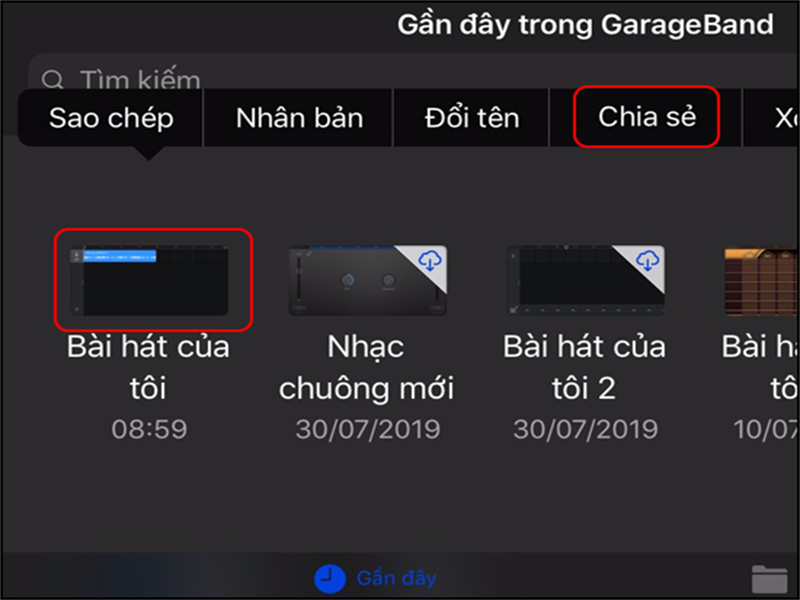
<p id="subhmenuid8"><strong>Bước 9: </strong>Chia sẻ bài hát</p>

<p>Bạn<strong>&nbsp;nhấn giữ vào bài hát</strong>&nbsp;của tôi &gt; Chọn&nbsp;<strong>Chia sẻ&nbsp;</strong>đến để tiếp tục.<br />
&nbsp;</p>

<h3>&nbsp; &nbsp; &nbsp; &nbsp; &nbsp; &nbsp; &nbsp; &nbsp; &nbsp; &nbsp; &nbsp; &nbsp; &nbsp; &nbsp; &nbsp; &nbsp; &nbsp; &nbsp; &nbsp; &nbsp; &nbsp; &nbsp; &nbsp; &nbsp; &nbsp; &nbsp; &nbsp; &nbsp; &nbsp; &nbsp; &nbsp; &nbsp; &nbsp;&nbsp;<img alt="Chia sẻ bài hát" data-original="//cdn1.tgdd.vn/hoi-dap/1033942/huong-dan-tao-nhac-chuong-truc-tiep-cho-iphone-10.jpg" height="411" src="https://cdn1.tgdd.vn/hoi-dap/1033942/huong-dan-tao-nhac-chuong-truc-tiep-cho-iphone-10.jpg" title="Chia sẻ bài hát" width="502" /></h3>
&nbsp;

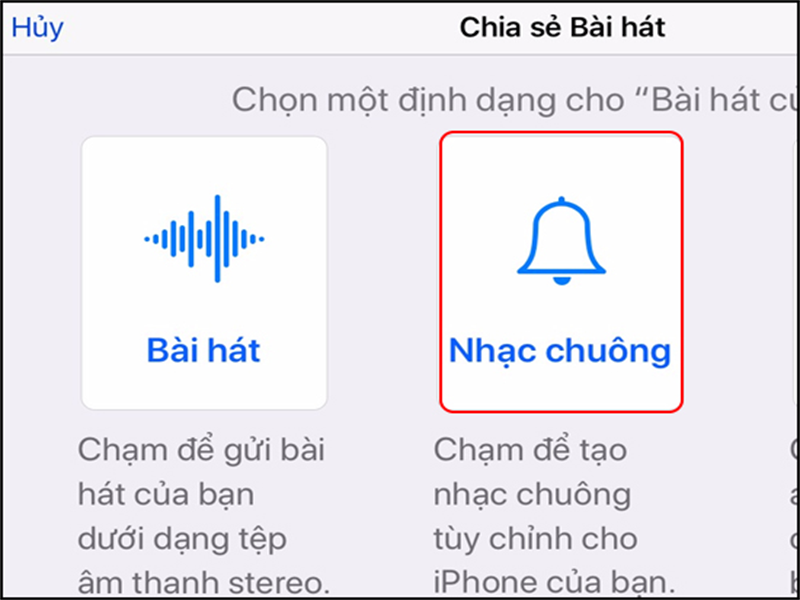
<p id="subhmenuid9"><strong>Bước 10: </strong>Chọn làm Nhạc chuông</p>

<p>Bạn chọn định dạng cho bài hát của mình để làm nhạc chuông cho điện thoại &gt; Chọn&nbsp;<strong>Nhạc chuông.</strong><br />
&nbsp;</p>

<h3>&nbsp; &nbsp; &nbsp; &nbsp; &nbsp; &nbsp; &nbsp; &nbsp; &nbsp; &nbsp; &nbsp; &nbsp; &nbsp; &nbsp; &nbsp; &nbsp; &nbsp; &nbsp; &nbsp; &nbsp; &nbsp; &nbsp; &nbsp; &nbsp; &nbsp; &nbsp; &nbsp; &nbsp; &nbsp; &nbsp; &nbsp; &nbsp; &nbsp;&nbsp;<img alt="Chọn Nhạc chuông" data-original="//cdn2.tgdd.vn/hoi-dap/1033942/huong-dan-tao-nhac-chuong-truc-tiep-cho-iphone-11.jpg" height="411" src="https://cdn2.tgdd.vn/hoi-dap/1033942/huong-dan-tao-nhac-chuong-truc-tiep-cho-iphone-11.jpg" title="Chọn Nhạc chuông" width="502" /></h3>
&nbsp;

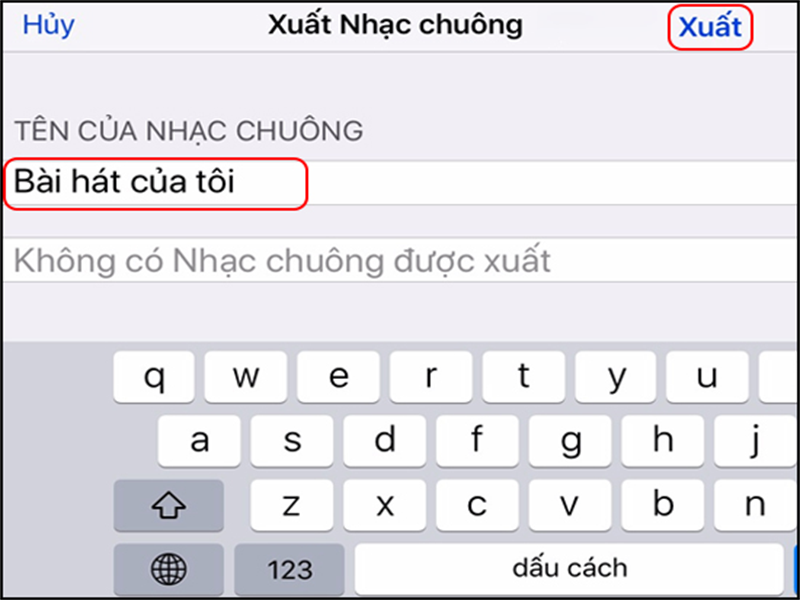
<p id="subhmenuid10"><strong>Bước 11: </strong>Xuất nhạc chuông</p>

<p>Bạn chọn vào tên của nhạc chuông&nbsp;<strong>để thay đổi tên</strong>&nbsp;theo sở thích &gt; Chọn<strong>&nbsp;Xuất.</strong><br />
&nbsp;</p>

<h3>&nbsp; &nbsp; &nbsp; &nbsp; &nbsp; &nbsp; &nbsp; &nbsp; &nbsp; &nbsp; &nbsp; &nbsp; &nbsp; &nbsp; &nbsp; &nbsp; &nbsp; &nbsp; &nbsp; &nbsp; &nbsp; &nbsp; &nbsp; &nbsp; &nbsp; &nbsp; &nbsp; &nbsp; &nbsp; &nbsp; &nbsp; &nbsp; &nbsp;&nbsp;<img alt="Sửa tên nhạc chuông, chọn Xuất" data-original="//cdn3.tgdd.vn/hoi-dap/1033942/huong-dan-tao-nhac-chuong-truc-tiep-cho-iphone-12.jpg" height="411" src="https://cdn3.tgdd.vn/hoi-dap/1033942/huong-dan-tao-nhac-chuong-truc-tiep-cho-iphone-12.jpg" title="Sửa tên nhạc chuông, chọn Xuất" width="502" /></h3>
&nbsp;

<p id="subhmenuid11"><strong>Bước 12:</strong> Chọn Sử dụng âm thanh làm nhạc chuông</p>

<p>Cuối cùng bạn chọn&nbsp;<strong>Sử dụng âm thanh làm nhạc chuông</strong>&nbsp;để thiết lập nhạc chuông cho điện thoại của mình.</p>

<p>Như vậy mình đã hướng dẫn xong cách tạo nhạc chuông cho iPhone mà không cần thông qua ứng dụng của máy tính. Hy vọng bài viết sẽ giúp ích cho bạn.</p>

<p>Chúc các bạn thành công.</p>

<blockquote>
<p><span style="font-size:16px;"><a href="https://hieuapple.com/news/tin-cong-nghe/huong-dan-quay-man-hinh-tren-iphone-cuc-de-415.html"><span style="color:rgb(52, 152, 219);"><strong>&gt;&gt;Cách quay màn hình trên iPhone</strong></span></a></span></p>
</blockquote>

<h2 data-original-attrs="{&#039;style&#039;:&#039;&#039;}"><span style="color:rgb(0, 0, 0);"><span style="font-size:20px;"><strong>Thông Tin Liên Hệ :</strong></span></span></h2>
&nbsp;

<p>Địa chỉ :&nbsp;<a href="https://www.google.com/maps/place/Hi%E1%BA%BFu+Store/@10.9443269,106.8558012,17z/data=!3m1!4b1!4m5!3m4!1s0x3174dffca3dd1bdf:0xf1a02d50958524c2!8m2!3d10.9443269!4d106.8579899"><span style="color:rgb(52, 152, 219);"><strong>501, Khu Phố 2, Phạm Văn Thuận, Tp. Biên Hòa, Đồng Nai.</strong></span></a></p>

<p>Email:&nbsp;<a href="mailto:hieuthanh@hieuapple.com.com"><span style="color:rgb(52, 152, 219);">hieuthanh@hieuapple.com</span></a><span style="color:rgb(52, 152, 219);">.</span></p>

<p>Website:&nbsp;<strong><a href="https://hieuapple.com/" rel="noopener noreferrer" target="_blank"><span style="color:rgb(52, 152, 219);">hieuapple.com</span></a><span style="color:rgb(52, 152, 219);">.</span></strong></p>

<p>FanPage:&nbsp;<a href="https://www.facebook.com/HieuAppleBH"><span style="color:rgb(52, 152, 219);"><strong>https://www.facebook.com/HieuAppleBH</strong></span></a></p>
		</div>
	</div>
	<div id="footer" class="clearfix">
		<div id="url">
			<strong>URL của bản tin này: </strong><a href="https://hieuapple.com/news/tin-cong-nghe/cach-tao-nhac-chuong-iphone-cuc-ky-don-gian-khong-phai-ra-tiem-413.html" title="Cách tạo nhạc chuông iPhone cực kỳ đơn giản không phải ra tiệm">https://hieuapple.com/news/tin-cong-nghe/cach-tao-nhac-chuong-iphone-cuc-ky-don-gian-khong-phai-ra-tiem-413.html</a>

		</div>
		<div class="clear"></div>
		<div class="copyright">
			&copy; Hiếu Store【&#x23;1】Về iPhone, iPad, Macbook chính hãng giá rẻ Biên Hoà
		</div>
		<div id="contact">
			<a href="mailto:admin@example.com">admin@example.com</a>
		</div>
	</div>
</div>
        <div id="timeoutsess" class="chromeframe">
            Bạn đã không sử dụng Site, <a onclick="timeoutsesscancel();" href="https://hieuapple.com/#">Bấm vào đây để duy trì trạng thái đăng nhập</a>. Thời gian chờ: <span id="secField"> 60 </span> giây
        </div>
        <div id="openidResult" class="nv-alert" style="display:none"></div>
        <div id="openidBt" data-result="" data-redirect=""></div>
<script src="https://hieuapple.com/assets/js/jquery/jquery.min.js"></script>
<script>var nv_base_siteurl="/",nv_lang_data="vi",nv_lang_interface="vi",nv_name_variable="nv",nv_fc_variable="op",nv_lang_variable="language",nv_module_name="news",nv_func_name="savefile",nv_is_user=0, nv_my_ofs=-4,nv_my_abbr="EDT",nv_cookie_prefix="nv4",nv_check_pass_mstime=3538000,nv_area_admin=0,nv_safemode=0,theme_responsive=1,nv_is_recaptcha=0;</script>
<script src="https://hieuapple.com/assets/js/language/vi.js"></script>
<script src="https://hieuapple.com/assets/js/global.js"></script>
<script src="https://hieuapple.com/themes/bcb_hieustore/js/news.js"></script>
<script src="https://hieuapple.com/themes/bcb_hieustore/js/main.js"></script>
<script type="application/ld+json">
        {
            "@context": "https://schema.org",
            "@type": "Organization",
            "url": "https://hieuapple.com",
            "logo": "https://hieuapple.com/uploads/logo.png"
        }
        </script>
<script>(function(w,d,s,l,i){w[l]=w[l]||[];w[l].push({'gtm.start':
new Date().getTime(),event:'gtm.js'});var f=d.getElementsByTagName(s)[0],
j=d.createElement(s),dl=l!='dataLayer'?'&l='+l:'';j.async=true;j.src=
'https://www.googletagmanager.com/gtm.js?id='+i+dl;f.parentNode.insertBefore(j,f);
})(window,document,'script','dataLayer','GTM-5G2NW99');</script>
<script async src="https://www.googletagmanager.com/gtag/js?id=AW-620688594"></script>
<script>
  window.dataLayer = window.dataLayer || [];
  function gtag(){dataLayer.push(arguments);}
  gtag('js', new Date());

  gtag('config', 'AW-620688594');
</script>
<script src="https://hieuapple.com/themes/bcb_hieustore/js/bootstrap.min.js"></script>
</body>
</html>
<ul class="extensions-contact">
    <li><a href="tel:1900588880" title="hotline"><img src="https://hieuapple.com/uploads/phone-call.svg" alt="hotline"><span>Gọi ngay</span></a></li>
    <li><a href="https://www.facebook.com/HieuAppleBH" title="facebook" target="_blank"><img src="https://hieuapple.com/uploads/messenger.svg" alt="facebook"><span>Messenger</span></a></li>
    <li><a href="https://zalo.me/0787999997" title="zalo" target="_blank"><img src="https://hieuapple.com/uploads/zalo.svg" alt="zalo"><span>Chat Zalo</span></a></li>
    <li><a href="https://www.google.com/maps/place/Hi%E1%BA%BFu+Apple+Store+-+Chuy%C3%AAn+iPhone+-+iPad+-+MacBook/@10.9440179,106.8556691,17z/data=!3m1!4b1!4m6!3m5!1s0x3174dd354aadc5d1:0x653f4de408b455ad!8m2!3d10.9440126!4d106.858244!16s%2Fg%2F11g0x2m4nv?entry=ttu&g_ep=EgoyMDI1MDQyMy4wIKXMDSoJLDEwMjExNDUzSAFQAw%3D%3D" title="maps" target="_blank"><img src="https://hieuapple.com/uploads/maps.svg" alt="maps"><span>Chỉ đường</span></a></li>
</ul>
<div class="float-contact">
<div class="chat-zalo"><a href="https://www.google.com/maps/place/Hi%E1%BA%BFu+Apple+Store+-+Chuy%C3%AAn+iPhone+-+iPad+-+MacBook/@10.9440179,106.8556691,17z/data=!3m1!4b1!4m6!3m5!1s0x3174dd354aadc5d1:0x653f4de408b455ad!8m2!3d10.9440126!4d106.858244!16s%2Fg%2F11g0x2m4nv?entry=ttu&g_ep=EgoyMDI1MDQyMy4wIKXMDSoJLDEwMjExNDUzSAFQAw%3D%3D"><img src="https://hieuapple.com/uploads/map-01.png"></a></div>
<div class="chat-face"><a href="https://www.facebook.com/HieuAppleBH"><img src="https://hieuapple.com/uploads/fb-01.png"></a></div>
</div>