<!DOCTYPE html>
    <html lang="vi" xmlns="http://www.w3.org/1999/xhtml" prefix="og: http://ogp.me/ns#">
    <head>
<title>Những điều bạn nên làm ngay sau khi mua iPhone mới - Hiếu Store</title>
<meta name="description" content="Những điều bạn nên làm ngay sau khi mua iPhone mới - Hiếu Store - Savefile - Tin Tức -...">
<meta name="author" content="Hiếu Store【#1】Về iPhone, iPad, Macbook chính hãng giá rẻ Biên Hoà">
<meta name="copyright" content="Hiếu Store【#1】Về iPhone, iPad, Macbook chính hãng giá rẻ Biên Hoà [admin@example.com]">
<meta name="generator" content="NukeViet v4.4">
<meta name="viewport" content="width=device-width, initial-scale=1">
<meta http-equiv="Content-Type" content="text/html; charset=utf-8">
<meta property="og:title" content="Những điều bạn nên làm ngay sau khi mua iPhone mới - Hiếu Store">
<meta property="og:type" content="website">
<meta property="og:description" content="Savefile - Tin Tức - https&#x3A;&#x002F;&#x002F;hieuapple.com&#x002F;news&#x002F;savefile&#x002F;tin-cong-nghe&#x002F;nhung-dieu-ban-nen-lam-ngay-sau-khi-mua-iphone-moi-hieu-store-446.html">
<meta property="og:site_name" content="Hiếu Store【&#x23;1】Về iPhone, iPad, Macbook chính hãng giá rẻ Biên Hoà">
<meta property="og:url" content="https://hieuapple.com/news/tin-cong-nghe/nhung-dieu-ban-nen-lam-ngay-sau-khi-mua-iphone-moi-hieu-store-446.html">
<link rel="shortcut icon" href="https://hieuapple.com/uploads/hieustore.png">
<link rel="canonical" href="https://hieuapple.com/news/tin-cong-nghe/nhung-dieu-ban-nen-lam-ngay-sau-khi-mua-iphone-moi-hieu-store-446.html">
<link rel="alternate" href="https://hieuapple.com/news/rss/" title="Tin Tức" type="application/rss+xml">
<link rel="alternate" href="https://hieuapple.com/news/rss/khuyen-mai/" title="Tin Tức - Khuyến mãi" type="application/rss+xml">
<link rel="alternate" href="https://hieuapple.com/news/rss/tin-cong-nghe/" title="Tin Tức - Tin công nghệ" type="application/rss+xml">
<link rel="alternate" href="https://hieuapple.com/news/rss/cong-thuc-mau/" title="Tin Tức - Công Thức Màu" type="application/rss+xml">
<link rel="preload" as="script" href="https://hieuapple.com/assets/js/jquery/jquery.min.js">
<link rel="preload" as="script" href="https://hieuapple.com/assets/js/language/vi.js">
<link rel="preload" as="script" href="https://hieuapple.com/assets/js/global.js">
<link rel="preload" as="script" href="https://hieuapple.com/themes/bcb_hieustore/js/news.js">
<link rel="preload" as="script" href="https://hieuapple.com/themes/bcb_hieustore/js/main.js">
<link rel="preload" as="script" href="https://www.googletagmanager.com/gtag/js?id=AW-620688594">
<link rel="preload" as="script" href="https://hieuapple.com/themes/bcb_hieustore/js/bootstrap.min.js">
<link rel="stylesheet" href="https://hieuapple.com/assets/css/font-awesome.min.css">
<link rel="stylesheet" href="https://hieuapple.com/themes/bcb_hieustore/css/bootstrap.min.css">
<link rel="stylesheet" href="https://hieuapple.com/themes/bcb_hieustore/css/style.css">
<link rel="stylesheet" href="https://hieuapple.com/themes/bcb_hieustore/css/style.responsive.css">
<link rel="StyleSheet" href="https://hieuapple.com/themes/bcb_hieustore/css/news.css">
<link rel="stylesheet" href="https://hieuapple.com/assets/css/bcb_hieustore.vi.0.css">
<style>
	body{background: #fff;}
.float-contact {position: fixed;bottom: 140px;left:55px;z-index: 99999;} .chat-zalo, .chat-face, .hotline{width: 50px;display: block;margin: 10px 5px;} .chat-zalo a>img, .chat-face a>img, .hotline a>img{width: 50px;} @media (max-width: 549px){.float-contact{display:block;}}

 @media screen and (max-width: 600px) {
  .float-contact {
display:none;
  }
}
 </style>
<!-- Google Tag Manager -->
<!-- End Google Tag Manager -->
<!-- Global site tag (gtag.js) - Google Ads: 620688594 -->
<script data-show="inline">(function(i,s,o,g,r,a,m){i['GoogleAnalyticsObject']=r;i[r]=i[r]||function(){
(i[r].q=i[r].q||[]).push(arguments)},i[r].l=1*new Date();a=s.createElement(o),
m=s.getElementsByTagName(o)[0];a.async=1;a.src=g;m.parentNode.insertBefore(a,m)
})(window,document,'script','https://www.google-analytics.com/analytics.js','ga');
ga('create', 'UA-173405386-1', '.hieuapple.com');
ga('send', 'pageview');
</script>
</head>
    <body class="page-news">
<div id="print">
	<div id="hd_print">
		<h2 class="pull-left">Hiếu Store【&#x23;1】Về iPhone, iPad, Macbook chính hãng giá rẻ Biên Hoà</h2>
		<p class="pull-right"><a title="Hiếu Store【&#x23;1】Về iPhone, iPad, Macbook chính hãng giá rẻ Biên Hoà" href="https://hieuapple.com/">https://hieuapple.com</a></p>
	</div>
	<div class="clear"></div>
	<hr />
	<div id="content">
		<h1>Những điều bạn nên làm ngay sau khi mua iPhone mới - Hiếu Store</h1>
		<ul class="list-inline">
			<li>Thứ ba - 15/11/2022 19:09</li>
			<li class="hidden-print txtrequired"><em class="fa fa-print">&nbsp;</em><a title="In ra" href="javascript:;" onclick="window.print()">In ra</a></li>
			<li class="hidden-print txtrequired"><em class="fa fa-power-off">&nbsp;</em><a title="Đóng cửa sổ này" href="javascript:;" onclick="window.close()">Đóng cửa sổ này</a></li>
		</ul>
		<div class="clear"></div>
		<div id="hometext">
			Đây là những thứ mình sẽ làm sau khi mua iPhone mới hoàn toàn, hoặc reset lại iPhone mới từ đầu. Mời các bạn tham khảo. Còn bạn sẽ làm những gì thì hãy comment vào bài này nhé.
		</div>
		<div id="bodytext" class="clearfix">
			<ul>
	<li><a href="https://hieuapple.com/news/tin-cong-nghe/iphone-12-tim-mo-mong-duoi-goc-nhin-can-canh-hieu-store-483.html"><span style="color:rgb(52, 152, 219);"><strong>iPhone 12 tím mơ mộng dưới góc nhìn cận cảnh</strong></span></a></li>
	<li><a href="https://hieuapple.com/news/tin-cong-nghe/so-sanh-ipad-nen-chon-mua-ipad-gen-8-air-2020-hay-pro-2020-45.html"><span style="color:rgb(52, 152, 219);"><strong>&quot;So sánh iPad&quot; : nên chọn mua iPad Gen 8, Air 2020 hay Pro 2020?</strong></span></a></li>
	<li><a href="https://hieuapple.com/news/tin-cong-nghe/apple-chinh-thuc-tra-loi-cau-hoi-co-nen-sac-iphone-qua-dem-hay-khong-19.html"><strong><span style="color:rgb(52, 152, 219);">Apple chính thức trả lời câu hỏi: &quot;Có nên sạc iPhone qua đêm hay không?&quot;</span></strong></a></li>
</ul>

<ul>
</ul>

<h2><span style="color:rgb(0, 0, 0);"><span style="font-size:20px;"><b>1. Thiết lập Face ID, Touch ID</b></span></span></h2>
&nbsp;

<p><a href="https://hieuapple.com/iphone/"><span style="color:rgb(52, 152, 219);"><strong>iPhone</strong></span></a> mới thì có <strong>Face ID</strong> là tính năng unlock điện thoại bằng gương mặt;&nbsp;còn <strong>iPhone SE</strong> hoặc các dòng iPhone cũ thì dùng cảm biến vân tay <strong>Touch ID</strong>. Dù máy bạn hỗ trợ <strong>Face ID</strong> hay <strong>Touch ID</strong> thì nên thiết lập nó càng sớm càng tốt. Vì nó sẽ ảnh hưởng tới một trong những thao tác bạn làm thường xuyên nhất: unlock máy. Xài đi;&nbsp;bạn sẽ thấy cực kì tiện và phê hơn <strong>passcode</strong> nhiều lắm.</p>

<p>Ngoài ra, <strong>Face ID / Touch ID</strong> còn được hỗ trợ trong rất nhiều app khác nhau. Như các app ngân hàng, app ví điện tử, mỗi lần vào không cần <strong>passcode</strong> mà chỉ cần quét mặt / ngón tay. Tiết kiệm rất nhiều thời gian và tăng độ tiện lợi lên nhiều.<br />
&nbsp;</p>

<h3 style="text-align: center;"><b><img alt="face ID" height="433" src="https://hieuapple.com/uploads/news/face-id.gif" style="border-radius:12px;" width="577" /></b></h3>
&nbsp;

<h2><span style="color:rgb(0, 0, 0);"><span style="font-size:20px;"><b>2. Đăng nhập iCloud</b></span></span></h2>
&nbsp;

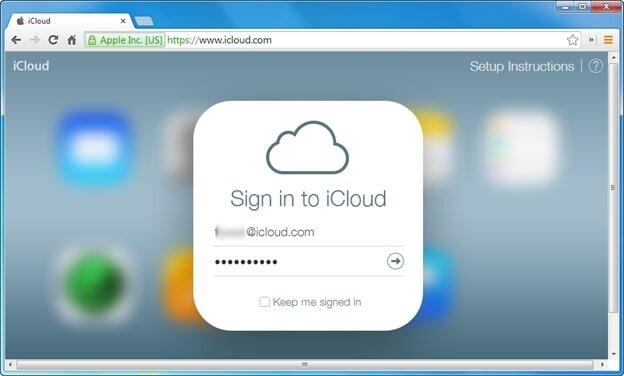
<p><strong>iCloud</strong> là tài khoản cơ bản để dùng được nhiều chức năng trong <a href="https://hieuapple.com/iphone/"><strong>iPhone</strong></a>;&nbsp;nếu bạn chưa có thì cần tạo 1 tài khoản mới;&nbsp;còn có rồi thì cần đăng nhập càng sớm càng tốt. Việc tạo tài khoản có thể thực hiện ngay trên <strong>iPhone</strong> ở giai đoạn thiết lập.</p>

<p>Lý do bạn cần đăng nhập <strong>iCloud;</strong>&nbsp;hay nói rộng hơn là đăng nhập&nbsp;<strong>Apple</strong>&nbsp;ID vào <strong>iPhone;</strong>&nbsp;vì bạn sẽ cần nó để:</p>

<ul>
	<li>Download ứng dụng từ <strong>App Store</strong></li>
	<li>Sao lưu ảnh lên cloud, tránh bị mất ảnh</li>
	<li>Sao lưu điện thoại lên<strong> iCloud</strong> để lỡ mất điện thoại thì có thể khôi phục rất nhanh chóng</li>
	<li>Bật chức năng tìm kiếm, khóa điện thoại từ xa lỡ khi bị mất</li>
</ul>

<p>Cơ bản thì bạn phải dùng <strong>iCloud</strong> mới chơi được hết những cái hay ho của <strong>iPhone</strong><br />
&nbsp;</p>

<h3 data-author="Duy Luân" style="text-align: center;"><img alt="dang nhap icloud" height="376" src="https://hieuapple.com/uploads/news/tin-tuc/dang-nhap-icloud.jpg" style="border-radius:12px;" width="624" /></h3>
&nbsp;

<h2><span style="font-size:20px;"><span style="color:rgb(0, 0, 0);"><b>3. Đăng nhập các tài khoản Google</b></span></span></h2>
&nbsp;

<p>Dù sử dụng <strong>iPhone</strong> nhưng mình vẫn dùng tài khoản <strong>Google</strong> để đồng bộ danh bạ;&nbsp;và mình nghĩ rằng các bạn cũng nên thế vì như vậy mới đảm bảo tính tương thích cao nhất giữa các máy. Giờ bạn xài <strong>iPhone;</strong>&nbsp;nhưng sau này bạn xài <strong>Android</strong> thì sao? Không bao giờ nên “lock down” vào một nhà sản xuất cố định nào cả. Đặc biệt với các dữ liệu quan trọng và cực kì khó kiếm lại như danh bạ.<br />
&nbsp;</p>

<h2><span style="color:rgb(0, 0, 0);"><span style="font-size:20px;"><b>4. Bật Find My iPhone</b></span></span></h2>
&nbsp;

<p><strong>Find My iPhone</strong> là chức năng giúp tìm điện thoại của bạn khi bị thất lạc, bị mất cắp, và trong trường hợp xấu nhất không thể tìm lại máy thì bạn cần khóa nó luôn và xóa dữ liệu để đảm bảo dữ liệu không bị lộ ra ngoài. <strong>Find My iPhone</strong> có thể được bật bằng cách vào <strong>Cài đặt &gt; Tên của bạn (ngay trên đầu) &gt; Tìm &gt; Tìm iPhone</strong>.<br />
&nbsp;</p>

<h2><span style="font-size:20px;"><span style="color:rgb(0, 0, 0);"><b>5. Cài các app quan trọng, đặc biệt là Google Maps</b></span></span></h2>
&nbsp;

<p>Cuối cùng là cài các app mà bạn thấy quan trọng. Với mình thì ưu tiên cài trước <strong>Facebook;</strong>&nbsp;<strong>Facebook Messenger;</strong>&nbsp;<strong>Instagram</strong>...</p>

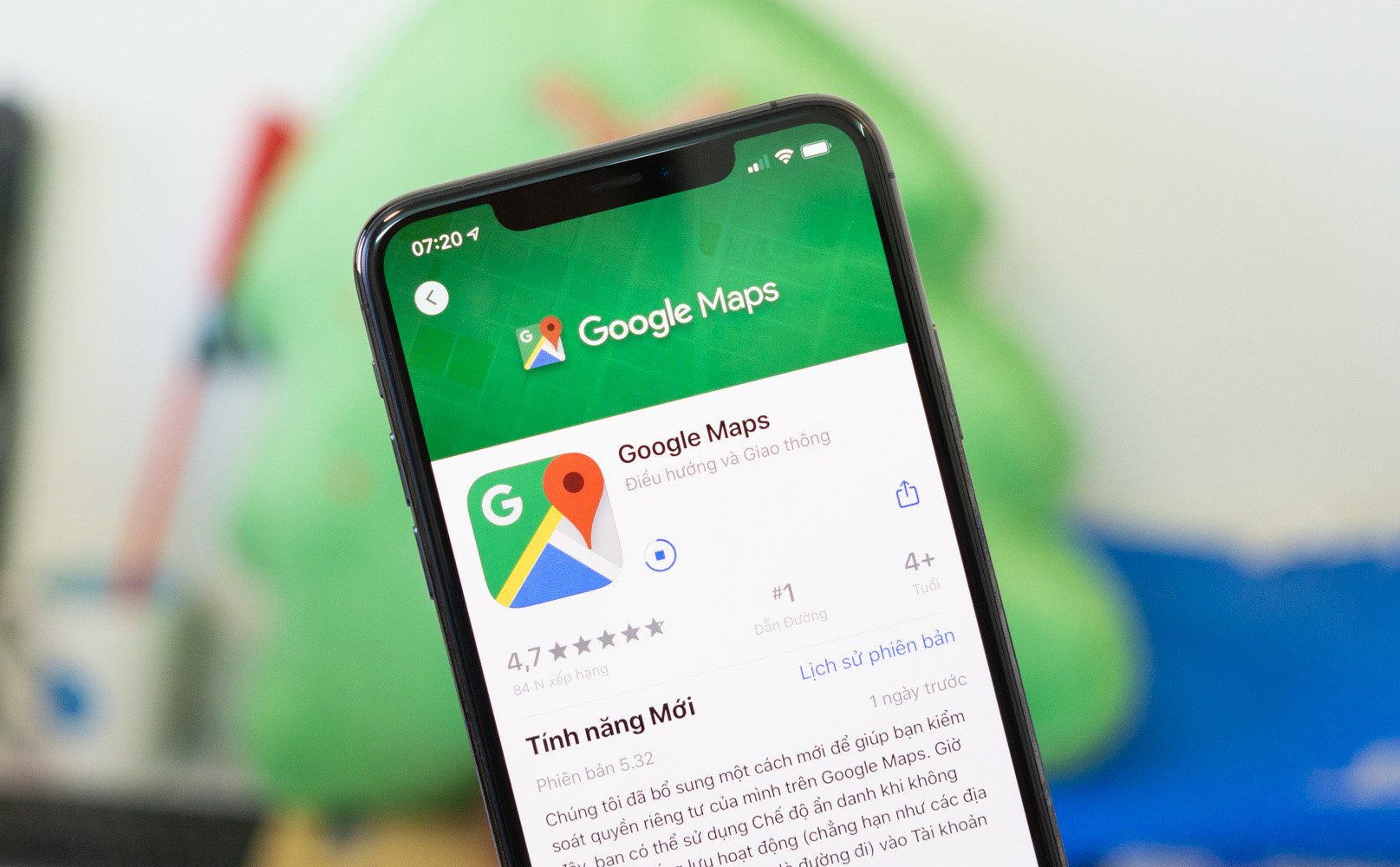
<p>Và đặc biệt, tất cả các bạn đều nên cài thêm <strong>Google Maps;</strong>&nbsp;app cực kì hữu ích nhưng buồn là không có sẵn trên <strong>iPhone</strong>. <strong>Google Maps</strong> vẫn dùng ngon hơn <strong>Apple Maps</strong> tại Việt Nam. Vì bản đồ chi tiết hơn;&nbsp;đặc biệt khi cần du lịch xa tới những thành phố;&nbsp;thị trấn nhỏ.<br />
&nbsp;</p>

<h3>&nbsp; &nbsp; &nbsp; &nbsp; &nbsp; &nbsp; &nbsp; &nbsp; &nbsp; &nbsp; &nbsp; &nbsp; &nbsp; &nbsp; &nbsp; &nbsp; &nbsp; &nbsp; &nbsp; &nbsp; &nbsp; &nbsp; &nbsp; &nbsp; &nbsp; &nbsp; &nbsp; &nbsp; &nbsp; &nbsp; &nbsp; &nbsp; &nbsp;&nbsp;<img alt="Google_Maps.jpg" data-height="1000" data-width="1615" height="399" src="https://photo2.tinhte.vn/data/attachment-files/2020/06/5042777_Google_Maps.jpg" style="border-radius:12px;" width="645" /></h3>
&nbsp;

<h2><span style="color:rgb(0, 0, 0);"><span style="font-size:20px;"><b>6. Tắt tự động gợi ý và sửa tiếng Việt</b></span></span></h2>
&nbsp;

<p>Nhiều anh em thích dùng gợi ý tiếng Việt của bàn phím. Nhưng mình khuyên nên dùng <strong>Anh - Việt</strong> xen kẽ + một số từ chuyên ngành nên <strong>autocorrect</strong> toàn chỉnh sai. Tắt đi ngay lập tức. Bạn có thể tắt tự động gợi ý bằng cách vào <strong>Cài đặt &gt; Cài đặt chung &gt; Bàn phím</strong>.<br />
&nbsp;</p>

<h2><span style="color:rgb(0, 0, 0);"><span style="font-size:20px;"><b>7. Bật chức năng tự động chuyển theme sáng - tối</b></span></span></h2>
&nbsp;

<p><strong>Vào Cài đặt &gt; Màn hình &amp; Độ sáng &gt; chọn theme</strong> chủ đạo bạn muốn, ngoài ra bật chữ <strong>&quot;Tự động&quot;</strong> lên để nó tự đổi giao diện của <strong>iOS</strong> (và các app) tùy theo thời điểm trong ngày. Buổi sáng thì xài <strong>theme sáng</strong>, buổi tối thì dùng <strong>theme tối</strong> cho đỡ chói mắt. Chức năng này hay, mình rất thích nó.</p>

<p>Sau khi làm mấy bước trên xong thì tận hưởng thôi. Và ở những lần sau thì bạn không cần phải thiết lập nhiều nữa vì <strong>iPhone</strong> có chức năng sao lưu rất ngon. Những lần mua máy mới sau, bạn chỉ cần <strong>restore</strong> lại bản backup từ <strong>iCloud</strong> xuống điện thoại của mình là xong.</p>

<p>Cám ơn bạn đã tham khảo thông tin về 10 điều nên làm sau khi mua iPhone. Chúc các bạn có thời gian trải nghiệm thật thú vị!<br />
&nbsp;</p>

<h2 style="text-align: center;"><span style="font-size:20px;"><a href="https://hieuapple.com/iphone/"><span style="color:rgb(236, 240, 241);"><strong><span style="background-color:rgb(231, 76, 60);">&nbsp; &nbsp; &nbsp; &nbsp; Xem&nbsp;Sản Phẩm iPhone&nbsp; &nbsp; &nbsp; &nbsp;&nbsp;</span></strong></span></a></span></h2>

<blockquote>
<p><span style="font-size:16px;"><a href="https://hieuapple.com/news/tin-cong-nghe/huong-dan-cach-tao-tai-khoan-id-apple-icloud-mien-phi-454.html"><span style="color:rgb(52, 152, 219);"><strong>&gt;&gt;Xem thêm bài viết về cách tạo iCloud miễn phí!</strong></span></a></span></p>
</blockquote>

<h2 data-original-attrs="{&#039;style&#039;:&#039;&#039;}"><span style="color:rgb(0, 0, 0);"><span style="font-size:20px;"><strong>Thông Tin Liên Hệ :</strong></span></span></h2>
&nbsp;

<p>Địa chỉ :&nbsp;<a href="https://www.google.com/maps/place/Hi%E1%BA%BFu+Store/@10.9443269,106.8558012,17z/data=!3m1!4b1!4m5!3m4!1s0x3174dffca3dd1bdf:0xf1a02d50958524c2!8m2!3d10.9443269!4d106.8579899"><span style="color:rgb(52, 152, 219);"><strong>501, Khu Phố 2, Phạm Văn Thuận, Tp. Biên Hòa, Đồng Nai.</strong></span></a></p>

<p>Email:&nbsp;<a href="mailto:hieuthanh@hieuapple.com.com"><span style="color:rgb(52, 152, 219);">hieuthanh@hieuapple.com</span></a><span style="color:rgb(52, 152, 219);">.</span></p>

<p>Website:&nbsp;<strong><a href="https://hieuapple.com/" rel="noopener noreferrer" target="_blank"><span style="color:rgb(52, 152, 219);">hieuapple.com</span></a><span style="color:rgb(52, 152, 219);">.</span></strong></p>

<p>FanPage:&nbsp;<a href="https://www.facebook.com/HieuAppleBH"><span style="color:rgb(52, 152, 219);"><strong>https://www.facebook.com/HieuAppleBH</strong></span></a></p>
		</div>
	</div>
	<div id="footer" class="clearfix">
		<div id="url">
			<strong>URL của bản tin này: </strong><a href="https://hieuapple.com/news/tin-cong-nghe/nhung-dieu-ban-nen-lam-ngay-sau-khi-mua-iphone-moi-hieu-store-446.html" title="Những điều bạn nên làm ngay sau khi mua iPhone mới - Hiếu Store">https://hieuapple.com/news/tin-cong-nghe/nhung-dieu-ban-nen-lam-ngay-sau-khi-mua-iphone-moi-hieu-store-446.html</a>

		</div>
		<div class="clear"></div>
		<div class="copyright">
			&copy; Hiếu Store【&#x23;1】Về iPhone, iPad, Macbook chính hãng giá rẻ Biên Hoà
		</div>
		<div id="contact">
			<a href="mailto:admin@example.com">admin@example.com</a>
		</div>
	</div>
</div>
        <div id="timeoutsess" class="chromeframe">
            Bạn đã không sử dụng Site, <a onclick="timeoutsesscancel();" href="https://hieuapple.com/#">Bấm vào đây để duy trì trạng thái đăng nhập</a>. Thời gian chờ: <span id="secField"> 60 </span> giây
        </div>
        <div id="openidResult" class="nv-alert" style="display:none"></div>
        <div id="openidBt" data-result="" data-redirect=""></div>
<div id="run_cronjobs" style="visibility:hidden;display:none;"><img alt="" src="/index.php?second=cronjobs&amp;p=h2N9lC7i" width="1" height="1" /></div>
<script src="https://hieuapple.com/assets/js/jquery/jquery.min.js"></script>
<script>var nv_base_siteurl="/",nv_lang_data="vi",nv_lang_interface="vi",nv_name_variable="nv",nv_fc_variable="op",nv_lang_variable="language",nv_module_name="news",nv_func_name="savefile",nv_is_user=0, nv_my_ofs=-4,nv_my_abbr="EDT",nv_cookie_prefix="nv4",nv_check_pass_mstime=3538000,nv_area_admin=0,nv_safemode=0,theme_responsive=1,nv_is_recaptcha=0;</script>
<script src="https://hieuapple.com/assets/js/language/vi.js"></script>
<script src="https://hieuapple.com/assets/js/global.js"></script>
<script src="https://hieuapple.com/themes/bcb_hieustore/js/news.js"></script>
<script src="https://hieuapple.com/themes/bcb_hieustore/js/main.js"></script>
<script type="application/ld+json">
        {
            "@context": "https://schema.org",
            "@type": "Organization",
            "url": "https://hieuapple.com",
            "logo": "https://hieuapple.com/uploads/logo.png"
        }
        </script>
<script>(function(w,d,s,l,i){w[l]=w[l]||[];w[l].push({'gtm.start':
new Date().getTime(),event:'gtm.js'});var f=d.getElementsByTagName(s)[0],
j=d.createElement(s),dl=l!='dataLayer'?'&l='+l:'';j.async=true;j.src=
'https://www.googletagmanager.com/gtm.js?id='+i+dl;f.parentNode.insertBefore(j,f);
})(window,document,'script','dataLayer','GTM-5G2NW99');</script>
<script async src="https://www.googletagmanager.com/gtag/js?id=AW-620688594"></script>
<script>
  window.dataLayer = window.dataLayer || [];
  function gtag(){dataLayer.push(arguments);}
  gtag('js', new Date());

  gtag('config', 'AW-620688594');
</script>
<script src="https://hieuapple.com/themes/bcb_hieustore/js/bootstrap.min.js"></script>
</body>
</html>
<ul class="extensions-contact">
    <li><a href="tel:1900588880" title="hotline"><img src="https://hieuapple.com/uploads/phone-call.svg" alt="hotline"><span>Gọi ngay</span></a></li>
    <li><a href="https://www.facebook.com/HieuAppleBH" title="facebook" target="_blank"><img src="https://hieuapple.com/uploads/messenger.svg" alt="facebook"><span>Messenger</span></a></li>
    <li><a href="https://zalo.me/0787999997" title="zalo" target="_blank"><img src="https://hieuapple.com/uploads/zalo.svg" alt="zalo"><span>Chat Zalo</span></a></li>
    <li><a href="https://www.google.com/maps/place/Hi%E1%BA%BFu+Apple+Store+-+Chuy%C3%AAn+iPhone+-+iPad+-+MacBook/@10.9440179,106.8556691,17z/data=!3m1!4b1!4m6!3m5!1s0x3174dd354aadc5d1:0x653f4de408b455ad!8m2!3d10.9440126!4d106.858244!16s%2Fg%2F11g0x2m4nv?entry=ttu&g_ep=EgoyMDI1MDQyMy4wIKXMDSoJLDEwMjExNDUzSAFQAw%3D%3D" title="maps" target="_blank"><img src="https://hieuapple.com/uploads/maps.svg" alt="maps"><span>Chỉ đường</span></a></li>
</ul>
<div class="float-contact">
<div class="chat-zalo"><a href="https://www.google.com/maps/place/Hi%E1%BA%BFu+Apple+Store+-+Chuy%C3%AAn+iPhone+-+iPad+-+MacBook/@10.9440179,106.8556691,17z/data=!3m1!4b1!4m6!3m5!1s0x3174dd354aadc5d1:0x653f4de408b455ad!8m2!3d10.9440126!4d106.858244!16s%2Fg%2F11g0x2m4nv?entry=ttu&g_ep=EgoyMDI1MDQyMy4wIKXMDSoJLDEwMjExNDUzSAFQAw%3D%3D"><img src="https://hieuapple.com/uploads/map-01.png"></a></div>
<div class="chat-face"><a href="https://www.facebook.com/HieuAppleBH"><img src="https://hieuapple.com/uploads/fb-01.png"></a></div>
</div>